Практически каждый веб-разработчик регулярно или время от времени работает с вёрсткой. Эта статья для начинающих верстальщиков и будущих программистов. В ней вы найдёте несколько необычных и редких инструментов и приёмов HTML/CSS.
Содержание
1. Фреймворк NES.css
Дети 90-х с ностальгией вспоминают 8-битную графику игр из консолей Nintendo. Видимо, японскому разработчику B.C.Rikko не хватает игрушек из прошлого. Он создал CSS-фреймворк NES.css, с помощью которого каждый желающий может стилизовать сайт или отдельную страницу под винтажную графику.
Сложно представить деловой сайт с оформлением в стиле Nintendo. Тем не менее в фреймворке NES.css есть минимальный набор компонентов и инструментов, необходимых для создания полноценной страницы. Вот некоторые инструменты и возможности фреймворка:
- Классы для оформления текста.
- Кнопки.
- Селекторы (радио и выпадающие), чекбоксы.
- Несколько вариантов полей для ввода (инпутов).
- Контейнеры для оформления разделов страниц.
- Списки и таблицы.
- Индикаторы прогресса (прогресс-бары).
- Значки, иконки.
- Персонажи игр Nintendo.
Обратите внимание, в фреймворке есть компоненты, но нет модульной сетки. Ее можно определить самостоятельно. Также можно воспользоваться любым готовым решением.
Фреймворк NES.css можно подключить к проекту с помощью npm или Yarn, а также через CDN. Подробную информацию смотрите в репозитории фреймворка на GitHub.
2. Сироты и вдовы в CSS (orphans and widows CSS)
Понятия «сироты» и «вдовы» пришло в CSS из типографской практики. Сирота — строка абзаца, которая перенеслась на новую страницу или колонку. Вдова — слово или строка из нескольких слов в конце страницы. Сироты и вдовы также называют висячими строками. Пример можно увидеть на иллюстрации.
Сироты и вдовы ухудшают читабельность текста и уменьшают визуальную привлекательность страницы.
В вебе проблема сирот и вдов решается с помощью CSS-свойств orphans и widows.
Свойство orphans применяется к блочным элементам, например, p или div. Определяет количество строк абзаца, которые должны остаться на предыдущей странице.
Свойство widows также применяется к блочным элементам. Определяет количество строк абзаца, которые переносятся на новую страницу.
Обратите внимание, Firefox не поддерживает свойства orphans и widows. Поддержку в других браузерах можно проверить с помощью сервиса Can I use: orphans и widows. Свойства orphans и widows входят в число Paged media, которые определяют внешний вид веб-страницы для печати.
3. Селекторы атрибутов
Почти все начинающие верстальщики знают, что к элементам можно обращаться через классы, идентификаторы и теги. Опытные специалисты применяют ещё и селекторы атрибутов.
Очень простой практический пример: с помощью селектора по атрибуту можно выделить на сайте все страницы с пустым атрибутом alt.
Это может пригодиться для внутренней оптимизации сайта: быстрого поиска фото с незаполненным атрибутом alt.
Вот пара практических примеров использования. С помощью селектора по атрибуту href можно произвольно оформлять ссылки на конкретные сайты или страницы. Например, выделим ссылку красным цветом.
Селекторы атрибутов удобно использовать для управления инпутами. Сделаем жёлтый фон в поле для ввода текста.
4. Свойство border-image
С помощью свойства border-image можно задать рамку элемента, в которой будет отображаться изображение.
Синтаксис такой:
Свойство border задает рамку, которая будет отображаться, если изображения нет или его невозможно загрузить. Свойство border-image-source определяет источник изображения рамки. В нем можно указать URL изображения или CSS-градиент.
Остальные свойства необязательные:
- border-image-slice определяет смещение изображения в рамке.
- border-image-width управляет толщиной рамки.
- border-image-outset позволяет сдвинуть рамку за пределы элемента.
- border-image-repeat контролирует повторение изображения в рамке.
Чтобы сделать градиентную рамку, укажите градиент в свойстве border-image-source.
Свойство border-image поддерживают основные современные браузеры. Подробнее об использовании свойства читайте в справочнике MDN.
5. List-style-image vs. background-image (добавляем изображения в качестве маркеров списка)
Задать изображение в качестве маркера списка можно с помощью свойства list-style-image.
Но при таком подходе появляется проблема: маркеры вертикально смещаются относительно элементов списка.
Выравнивание с помощью vertical-align в этом случае не работает. Поэтому изображения в качестве маркеров списка удобнее задавать с помощью background-image.
Сначала обнуляем отображение маркеров.
Теперь добавляем фоновое изображение к элементам списка.
В свойстве background-image указан URL изображения, свойство background-repeat в данном случае отменяет повторение фонового изображения. Свойство line-height задает высоту строки. Этот показатель должен коррелировать с размером фонового изображения. Свойство padding-left позиционирует текст относительно фонового изображения.
6. Добавляем расшифровку аббревиатуры
Очень простой инструмент, с помощью которого удобно расшифровывать акронимы и аббревиатуры в тексте.
Справка: аббревиатура — слово, образованное из первых букв нескольких слов, например, США; акроним — вид аббревиатуры, который произносится слитно, а не по буквам, например, комсомол.
Задать расшифровку для аббревиатуры можно с помощью тега abbr.
Тег добавляет к тексту подсказку, которая всплывает при наведении курсора.
Точно так же работает тег acronym. Но он считается устаревшим, поэтому поддержка во всех браузерах не гарантируется. Предпочтительно всегда использовать тег abbr.
7. Трансформация изображений
Свойство transform применяется к разным элементам страницы. Но чаще всего его используют для работы с изображениями. Например, transform: rotate() позволяет повернуть фотографию. Это может потребоваться при верстке сложных макетов.
Свойство transform: skewX() наклоняет изображение на заданный градус по вертикали.
Свойство transform: skewY() наклоняет изображение на заданный градус по горизонтали.
Свойства transform: translateX() и transform: translateY() сдвигают изображение на заданное число пикселей по вертикали и горизонтали.
Современные браузеры поддерживают свойство transform. Подробную документацию смотрите в справочнике MDN.
Подборка необычных инструментов вёрстки остается открытой. Пишите в комментариях о необычных приёмах и техниках, с которыми вы сталкивались во время обучения или работы.
<!DOCTYPE html>
<html class="h-100" data-bs-theme="light" data-mantine-color-scheme="light" lang="ru" prefix="og: https://ogp.me/ns#">
<head>
<meta content="width=device-width, initial-scale=1.0" name="viewport">
<meta content="IE=Edge" http-equiv="X-UA-Compatible">
<link crossorigin="true" href="https://cdn.hexlet.io" rel="preconnect">
<link href="https://mc.yandex.ru" rel="preconnect">
<meta content="aa2vrdtq64dub8knuf83lwywit311w" name="facebook-domain-verification">
<link href="/favicon.ico" rel="icon" sizes="any">
<link href="/favicon.svg" rel="icon" type="image/svg+xml">
<link href="/apple-touch-icon.png" rel="apple-touch-icon">
<link href="/manifest.webmanifest" rel="manifest">
<script>
//<![CDATA[
window.gon={};gon.ym_counter="25559621";gon.is_bot=true;gon.applications={};gon.current_user={"id":null,"last_viewed_notification_id":null,"email":null,"state":null,"first_name":"","last_name":"","created_at":"2026-02-26 15:06:22 UTC","current_program":null,"current_team":null,"full_name":"","guest":true,"can_use_paid_features":false,"is_hexlet_employee":false,"sanitized_phone_number":"","can_subscribe":true,"can_renew_education":false};gon.token="j16tZTiP7DbX9XIu3O4-QIO2hMJF7gkB2accEIIuJzdgj2ZSyvFBVmG2VrbQ4c43Q7-paE3Z96NkR4ZE0CnAWQ";gon.locale="ru";gon.language="ru";gon.theme="light";gon.rails_env="production";gon.mobile=false;gon.google={"analytics_key":"UA-1360700-51","optimize_key":"GTM-5QDVFPF"};gon.captcha={"google_v3_site_key":"6LenGbgZAAAAAM7HbrDbn5JlizCSzPcS767c9vaY","yandex_site_key":"ysc1_Vyob5ZPPUdPBsu0ykt8bVFdzsfpoVjQChLGl2b4g19647a89","verification_failed":null};gon.social_signin=false;gon.typoreporter_google_form_id="1FAIpQLSeibfGq-KvWQ2Fyru-zkFFRVTLBuzXAHAoEyN1p49FtDmNoNA";
//]]>
</script>
<meta charset="utf-8">
<title>Селекторы атрибутов, ностальгический фреймворк, сироты и вдовы: 7 необычных приёмов и инструментов HTML/CSS</title>
<meta name="description" content="Эта статья для начинающих верстальщиков и будущих программистов. В ней вы найдёте несколько необычных и редких инструментов и приёмов HTML/CSS.">
<link rel="canonical" href="https://ru.hexlet.io/blog/posts/selektory-atributov-nostalgicheskiy-freymvork-siroty-i-vdovy-7-neobychnyh-priyomov-i-instrumentov-html-css">
<meta property="og:title" content="Селекторы атрибутов, ностальгический фреймворк, сироты и вдовы: 7 необычных приёмов и инструментов HTML/CSS">
<meta property="og:description" content="Эта статья для начинающих верстальщиков и будущих программистов. В ней вы найдёте несколько необычных и редких инструментов и приёмов HTML/CSS. ">
<meta property="og:image" content="https://ru.hexlet.io/vite/assets/blog_post-7eTyeLLt.webp">
<meta name="csrf-param" content="authenticity_token" />
<meta name="csrf-token" content="LLhiddv9U_J2kFtaV9mR46NjPM-FZ5SnlVJ8n6oYgRTDaalCKYP-ksDTf8Jb1mGUY2oRZY1QagUosubL-B9meg" />
<script src="/vite/assets/inertia-INZxX8jp.js" crossorigin="anonymous" type="module"></script><link rel="modulepreload" href="/vite/assets/chunk-DsPFFUou.js" as="script" crossorigin="anonymous">
<link rel="modulepreload" href="/vite/assets/preload-helper-BJ4cLWpC.js" as="script" crossorigin="anonymous">
<link rel="modulepreload" href="/vite/assets/init-nkZBEvfU.js" as="script" crossorigin="anonymous">
<link rel="modulepreload" href="/vite/assets/ahoy-DrlRQ-1D.js" as="script" crossorigin="anonymous">
<link rel="modulepreload" href="/vite/assets/analytics-6pOtQ3OW.js" as="script" crossorigin="anonymous">
<link rel="modulepreload" href="/vite/assets/ErrorFallbackBlock-naDSYSy9.js" as="script" crossorigin="anonymous">
<link rel="modulepreload" href="/vite/assets/Surface-DL2bpZA-.js" as="script" crossorigin="anonymous">
<link rel="modulepreload" href="/vite/assets/gon-D3e4yh1x.js" as="script" crossorigin="anonymous">
<link rel="modulepreload" href="/vite/assets/mantine-CGMYrt2Y.js" as="script" crossorigin="anonymous">
<link rel="modulepreload" href="/vite/assets/utils-DRqSHbQE.js" as="script" crossorigin="anonymous">
<link rel="modulepreload" href="/vite/assets/routes-CCH8ilKF.js" as="script" crossorigin="anonymous">
<link rel="modulepreload" href="/vite/assets/extends-C-EagtpE.js" as="script" crossorigin="anonymous">
<link rel="modulepreload" href="/vite/assets/inheritsLoose-BBd-DCVI.js" as="script" crossorigin="anonymous">
<link rel="modulepreload" href="/vite/assets/objectWithoutPropertiesLoose-DRHXDhjp.js" as="script" crossorigin="anonymous">
<link rel="modulepreload" href="/vite/assets/index.esm-DAqKOkZ0.js" as="script" crossorigin="anonymous">
<link rel="modulepreload" href="/vite/assets/Button-CGPUux8l.js" as="script" crossorigin="anonymous">
<link rel="modulepreload" href="/vite/assets/CloseButton-D1euiPao.js" as="script" crossorigin="anonymous">
<link rel="modulepreload" href="/vite/assets/Group-BX48WcuU.js" as="script" crossorigin="anonymous">
<link rel="modulepreload" href="/vite/assets/Loader-BQEY8g6v.js" as="script" crossorigin="anonymous">
<link rel="modulepreload" href="/vite/assets/Modal-Cy3HByv7.js" as="script" crossorigin="anonymous">
<link rel="modulepreload" href="/vite/assets/OptionalPortal-1Hza5P2w.js" as="script" crossorigin="anonymous">
<link rel="modulepreload" href="/vite/assets/Stack-CtjJzfw4.js" as="script" crossorigin="anonymous">
<link rel="modulepreload" href="/vite/assets/Textarea-Ck64llAy.js" as="script" crossorigin="anonymous">
<link rel="modulepreload" href="/vite/assets/Box-B5-OOzBf.js" as="script" crossorigin="anonymous">
<link rel="modulepreload" href="/vite/assets/DirectionProvider-Dc9zdUke.js" as="script" crossorigin="anonymous">
<link rel="modulepreload" href="/vite/assets/events-DJQOhap0.js" as="script" crossorigin="anonymous">
<link rel="modulepreload" href="/vite/assets/use-reduced-motion-D2owz4wa.js" as="script" crossorigin="anonymous">
<link rel="modulepreload" href="/vite/assets/use-disclosure-zKtK5W1r.js" as="script" crossorigin="anonymous">
<link rel="modulepreload" href="/vite/assets/use-hotkeys-Cnc_Rwkb.js" as="script" crossorigin="anonymous">
<link rel="modulepreload" href="/vite/assets/random-id-DOQyszCZ.js" as="script" crossorigin="anonymous">
<link rel="modulepreload" href="/vite/assets/notifications.store-C-3AFSMn.js" as="script" crossorigin="anonymous">
<link rel="modulepreload" href="/vite/assets/exports-C_MrNx_T.js" as="script" crossorigin="anonymous">
<link rel="modulepreload" href="/vite/assets/axios-BEvgo0ym.js" as="script" crossorigin="anonymous">
<link rel="modulepreload" href="/vite/assets/dayjs.min-BkKovM-s.js" as="script" crossorigin="anonymous">
<link rel="modulepreload" href="/vite/assets/i18next-BlSq9s7B.js" as="script" crossorigin="anonymous">
<link rel="modulepreload" href="/vite/assets/client-U9M77rxp.js" as="script" crossorigin="anonymous">
<link rel="modulepreload" href="/vite/assets/react-dom-DaLxUz_h.js" as="script" crossorigin="anonymous">
<link rel="modulepreload" href="/vite/assets/useTranslation-Bx1Cdrkz.js" as="script" crossorigin="anonymous">
<link rel="modulepreload" href="/vite/assets/compiler-runtime-6XxiPFnt.js" as="script" crossorigin="anonymous">
<link rel="modulepreload" href="/vite/assets/jsx-runtime-CwjcCKJi.js" as="script" crossorigin="anonymous">
<link rel="modulepreload" href="/vite/assets/react-CkL4ZRHB.js" as="script" crossorigin="anonymous">
<link rel="stylesheet" href="/vite/assets/application-BqhCP46M.js" />
<script src="/vite/assets/application-Df9RExpe.js" crossorigin="anonymous" type="module"></script><link rel="modulepreload" href="/vite/assets/chunk-DsPFFUou.js" as="script" crossorigin="anonymous">
<link rel="modulepreload" href="/vite/assets/autocomplete-VMNbxKGl.js" as="script" crossorigin="anonymous">
<link rel="modulepreload" href="/vite/assets/routes-CCH8ilKF.js" as="script" crossorigin="anonymous">
<link rel="modulepreload" href="/vite/assets/createPopper-C3aM9r1M.js" as="script" crossorigin="anonymous">
<link rel="modulepreload" href="/vite/assets/js.cookie-D1-O8zkX.js" as="script" crossorigin="anonymous"><link rel="stylesheet" href="/vite/assets/application-C8HjmMaq.css" media="screen" />
<script>
window.ym = function(){(ym.a=ym.a||[]).push(arguments)};
window.addEventListener('load', function() {
setTimeout(function() {
ym.l = 1*new Date();
ym(window.gon.ym_counter, "init", {
clickmap: true,
trackLinks: true,
accurateTrackBounce: true,
webvisor: true
});
// Загружаем скрипт
var k = document.createElement('script');
k.async = 1;
k.src = 'https://mc.yandex.ru/metrika/tag.js';
document.head.appendChild(k);
ym(window.gon.ym_counter, 'getClientID', function(clientID) {
window.ymClientId = clientID;
});
}, 1500);
});
</script>
<!-- Google Tag Manager - deferred -->
<script>
// dataLayer stub сразу — пуши работают до загрузки скрипта
window.dataLayer = window.dataLayer || [];
// Сам скрипт — отложенно после load
window.addEventListener('load', function() {
setTimeout(function() {
dataLayer.push({'gtm.start': new Date().getTime(), event: 'gtm.js'});
var j = document.createElement('script');
j.async = true;
j.src = 'https://www.googletagmanager.com/gtm.js?id=GTM-WK88TH';
document.head.appendChild(j);
}, 1500);
});
</script>
<!-- End Google Tag Manager -->
</head>
<body>
<noscript>
<div>
<img alt="" src="https://mc.yandex.ru/watch/25559621" style="position:absolute; left:-9999px;">
</div>
</noscript>
<header class="sticky-top bg-body">
<nav class="navbar navbar-expand-lg">
<div class="container-xxl">
<a class="navbar-brand" href="/"><img alt="Логотип Хекслета" height="24" src="https://ru.hexlet.io/vite/assets/logo_ru_light-BpiEA1LT.svg" width="96">
</a><button aria-controls="collapsable" aria-expanded="false" aria-label="Меню" class="navbar-toggler border-0 mb-0 mt-1" data-bs-target="#collapsable" data-bs-toggle="collapse">
<span class="navbar-toggler-icon"></span>
</button>
<div class="collapse navbar-collapse" id="collapsable">
<ul class="navbar-nav mb-lg-0 mt-lg-1">
<li class="nav-item dropdown">
<button aria-haspopup class="btn nav-link" data-bs-toggle="dropdown" type="button">
Все курсы
<span class="bi bi-chevron-down align-middle ms-1"></span>
</button>
<ul class="dropdown-menu">
<li>
<a class="dropdown-item d-flex py-2" href="/courses"><div class="fw-bold me-auto">Все что есть</div>
<div class="text-muted">117</div>
</a></li>
<li>
<hr class="dropdown-divider">
</li>
<li class="dropdown-item">
<b>Популярные категории</b>
</li>
<li>
<a class="dropdown-item py-2" href="/courses_devops">Курсы по DevOps
</a></li>
<li>
<a class="dropdown-item py-2" href="/courses_data_analytics">Курсы по аналитике данных
</a></li>
<li>
<a class="dropdown-item py-2" href="/courses_programming">Курсы по программированию
</a></li>
<li>
<a class="dropdown-item py-2" href="/courses_testing">Курсы по тестированию
</a></li>
<li>
<hr class="dropdown-divider">
</li>
<li class="dropdown-item">
<b>Популярные курсы</b>
</li>
<li>
<a class="dropdown-item py-2" href="/programs/devops-engineer-from-scratch">DevOps-инженер с нуля
</a></li>
<li>
<a class="dropdown-item py-2" href="/programs/go">Go-разработчик
</a></li>
<li>
<a class="dropdown-item py-2" href="/programs/java">Java-разработчик
</a></li>
<li>
<a class="dropdown-item py-2" href="/programs/python">Python-разработчик
</a></li>
<li>
<a class="dropdown-item py-2" href="/programs/qa-auto-engineer-java">Автоматизатор тестирования на Java
</a></li>
<li>
<a class="dropdown-item py-2" href="/programs/data-analytics">Аналитик данных
</a></li>
<li>
<a class="dropdown-item py-2" href="/programs/frontend">Фронтенд-разработчик
</a></li>
</ul>
</li>
<li class="nav-item dropdown">
<button aria-haspopup class="btn nav-link" data-bs-toggle="dropdown" type="button">
О Хекслете
<span class="bi bi-chevron-down align-middle"></span>
</button>
<ul class="dropdown-menu bg-body">
<li>
<a class="dropdown-item py-2" href="/pages/about">О нас
</a></li>
<li>
<a class="dropdown-item py-2" href="/blog">Блог
</a></li>
<li>
<span class="dropdown-item py-2 external-link" data-href="https://special.hexlet.io/hse-research" role="button">Результаты (Исследование)
</span></li>
<li>
<span class="dropdown-item py-2 external-link" data-href="https://career.hexlet.io" role="button">Хекслет Карьера
</span></li>
<li>
<a class="dropdown-item py-2" href="/testimonials">Отзывы студентов
</a></li>
<li>
<span class="dropdown-item py-2 external-link" data-href="https://t.me/hexlet_help_bot" role="button">Поддержка (В ТГ)
</span></li>
<li>
<span class="dropdown-item py-2 external-link" data-href="https://special.hexlet.io/referal-program/?promo_creative=priglasite-druzei&promo_name=referal-program&promo_position=promo_position&promo_start=010724&promo_type=link" role="button">Реферальная программа
</span></li>
<li>
<span class="dropdown-item py-2 external-link" data-href="https://special.hexlet.io/certificate" role="button">Подарочные сертификаты
</span></li>
<li>
<span class="dropdown-item py-2 external-link" data-href="https://hh.ru/employer/4307094" role="button">Вакансии
</span></li>
<li>
<span class="dropdown-item d-flex external-link" rel="noopener noreferrer nofollow" data-href="https://b2b.hexlet.io" data-target="_blank" role="button">Компаниям
</span></li>
<li>
<span class="dropdown-item d-flex external-link" rel="noopener noreferrer nofollow" data-href="https://hexly.ru/" data-target="_blank" role="button">Колледж
</span></li>
<li>
<span class="dropdown-item d-flex external-link" rel="noopener noreferrer nofollow" data-href="https://hexlyschool.ru/" data-target="_blank" role="button">Частная школа
</span></li>
</ul>
</li>
<li><a class="nav-link" href="/subscription/new">Подписка</a></li>
</ul>
<ul class="navbar-nav flex-lg-row align-items-lg-center gap-2 ms-auto">
<li>
<a class="nav-link" aria-label="Переключить тему" href="/theme/switch?new_theme=dark"><span aria-hidden="true" class="bi bi-moon"></span>
</a></li>
<li>
<span data-target="_self" class="nav-link external-link" data-href="/u/new" role="button"><span>Регистрация</span>
</span></li>
<li>
<span data-target="_self" class="nav-link external-link" data-href="https://ru.hexlet.io/session/new" role="button"><span>Вход</span>
</span></li>
</ul>
</div>
</div>
</nav>
</header>
<div class="x-container-xxxl">
</div>
<main class="mb-6 min-vh-100 h-100">
<link rel="preload" as="image" href="/vite/assets/blog_post-7eTyeLLt.webp"/><link rel="preload" as="image" href="https://hexlet.io/rails/active_storage/representations/proxy/eyJfcmFpbHMiOnsiZGF0YSI6NDAzNCwicHVyIjoiYmxvYl9pZCJ9fQ==--ba516ea9573bdfcd1d21e2aa0fff8818561828f2/eyJfcmFpbHMiOnsiZGF0YSI6eyJmb3JtYXQiOiJ3ZWJwIiwicmVzaXplX3RvX2xpbWl0IjpbNDAwLDQwMF0sInNhdmVyIjp7InF1YWxpdHkiOjg1fX0sInB1ciI6InZhcmlhdGlvbiJ9fQ==--5b6f46dacd1af664f27558553a58076185091823/Typing-bro.png"/><link rel="preload" as="image" href="https://hexlet.io/rails/active_storage/representations/proxy/eyJfcmFpbHMiOnsiZGF0YSI6NDAwNCwicHVyIjoiYmxvYl9pZCJ9fQ==--43a2eb3595eeebb3357d478cbcb752d0026363de/eyJfcmFpbHMiOnsiZGF0YSI6eyJmb3JtYXQiOiJ3ZWJwIiwicmVzaXplX3RvX2xpbWl0IjpbNDAwLDQwMF0sInNhdmVyIjp7InF1YWxpdHkiOjg1fX0sInB1ciI6InZhcmlhdGlvbiJ9fQ==--5b6f46dacd1af664f27558553a58076185091823/Website%20Creator-cuate.png"/><link rel="preload" as="image" href="https://hexlet.io/rails/active_storage/representations/proxy/eyJfcmFpbHMiOnsiZGF0YSI6NDAyNSwicHVyIjoiYmxvYl9pZCJ9fQ==--3b94875bb52777724a7b11b075b8891f331d8cdf/eyJfcmFpbHMiOnsiZGF0YSI6eyJmb3JtYXQiOiJ3ZWJwIiwicmVzaXplX3RvX2xpbWl0IjpbNDAwLDQwMF0sInNhdmVyIjp7InF1YWxpdHkiOjg1fX0sInB1ciI6InZhcmlhdGlvbiJ9fQ==--5b6f46dacd1af664f27558553a58076185091823/Programming-amico.png"/><link rel="preload" as="image" href="https://hexlet.io/rails/active_storage/representations/proxy/eyJfcmFpbHMiOnsiZGF0YSI6NDAyMiwicHVyIjoiYmxvYl9pZCJ9fQ==--8e763c5a65cfc8d5e67cb29ae3d1881ad23c714e/eyJfcmFpbHMiOnsiZGF0YSI6eyJmb3JtYXQiOiJ3ZWJwIiwicmVzaXplX3RvX2xpbWl0IjpbNDAwLDQwMF0sInNhdmVyIjp7InF1YWxpdHkiOjg1fX0sInB1ciI6InZhcmlhdGlvbiJ9fQ==--5b6f46dacd1af664f27558553a58076185091823/Hand%20coding-bro.png"/><link rel="preload" as="image" href="https://hexlet.io/rails/active_storage/representations/proxy/eyJfcmFpbHMiOnsiZGF0YSI6MzcyNywicHVyIjoiYmxvYl9pZCJ9fQ==--2d5cbbf5c3b4a73ae4b2c50632305d78f5872e4d/eyJfcmFpbHMiOnsiZGF0YSI6eyJmb3JtYXQiOiJ3ZWJwIiwicmVzaXplX3RvX2xpbWl0IjpbNDAwLDQwMF0sInNhdmVyIjp7InF1YWxpdHkiOjg1fX0sInB1ciI6InZhcmlhdGlvbiJ9fQ==--5b6f46dacd1af664f27558553a58076185091823/Programmer-rafiki.png"/><link rel="preload" as="image" href="/vite/assets/development-BVihs_d5.png"/><div id="app" data-page="{"component":"web/blog/posts/show","props":{"errors":{},"locale":"ru","language":"ru","httpsHost":"https://ru.hexlet.io","host":"ru.hexlet.io","colorScheme":"light","auth":{"user":{"id":null,"last_viewed_notification_id":null,"email":null,"state":null,"first_name":"","last_name":"","created_at":"2026-02-26T15:06:22.099Z","current_program":null,"current_team":null,"full_name":"","guest":true,"can_use_paid_features":false,"is_hexlet_employee":false,"sanitized_phone_number":"","can_subscribe":true,"can_renew_education":false}},"cloudflareTurnstileSiteKey":"0x4AAAAAAA15KmeFXzd2H0Xo","vkIdClientId":"51586979","yandexIdClientId":"88d071f1d3384eb4bd1deb37910235c7","formAuthToken":"8MxkQWSLVGlXB6a53mZska6Y1D9YgEAz_m4hyEJaWccfHa92lvX5CeFEgiHSaZzmbpH5lVC3vpFDjrucEF2-qQ","post":{"model_name":"BlogPost","category":{"id":4,"name":"Код","slug":"code","state":"published","created_at":"2016-08-23T13:33:44.258Z"},"creator":{"public_name":"Дмитрий Дементий","id":174372,"is_tutor":false},"tags":[{"id":1443,"slug":"frontend","name":"Фронтенд"}],"id":357,"title":"Селекторы атрибутов, ностальгический фреймворк, сироты и вдовы: 7 необычных приёмов и инструментов HTML/CSS","slug":"selektory-atributov-nostalgicheskiy-freymvork-siroty-i-vdovy-7-neobychnyh-priyomov-i-instrumentov-html-css","state":"published","summary":"Эта статья для начинающих верстальщиков и будущих программистов. В ней вы найдёте несколько необычных и редких инструментов и приёмов HTML/CSS. ","votes_count":14,"created_at":"2019-06-14T10:53:31.276Z","published_at":"2019-06-14T14:19:30.991Z","body":"Практически каждый веб-разработчик регулярно или время от времени работает с вёрсткой. Эта статья для начинающих верстальщиков и будущих программистов. В ней вы найдёте несколько необычных и редких инструментов и приёмов HTML/CSS. \n\n## Содержание\n\n## 1. Фреймворк NES.css\nДети 90-х с ностальгией вспоминают 8-битную графику игр из консолей Nintendo. Видимо, японскому разработчику B.C.Rikko не хватает игрушек из прошлого. Он создал CSS-фреймворк NES.css, с помощью которого каждый желающий может стилизовать сайт или отдельную страницу под винтажную графику.\n\n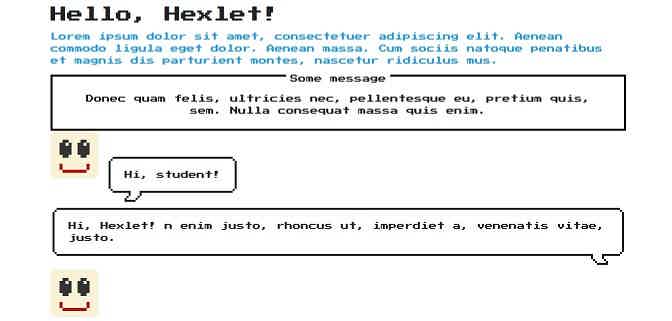\n\nСложно представить деловой сайт с оформлением в стиле Nintendo. Тем не менее в фреймворке NES.css есть минимальный набор компонентов и инструментов, необходимых для создания полноценной страницы. Вот некоторые инструменты и возможности фреймворка:\n* Классы для оформления текста. \n* Кнопки. \n* Селекторы (радио и выпадающие), чекбоксы. \n* Несколько вариантов полей для ввода (инпутов). \n* Контейнеры для оформления разделов страниц. \n* Списки и таблицы. \n* Индикаторы прогресса (прогресс-бары). \n* Значки, иконки.\n* Персонажи игр Nintendo. \n\nОбратите внимание, в фреймворке есть компоненты, но нет модульной сетки. Ее можно [определить самостоятельно](https://ru.hexlet.io/courses/html). Также можно воспользоваться любым готовым решением.\n\n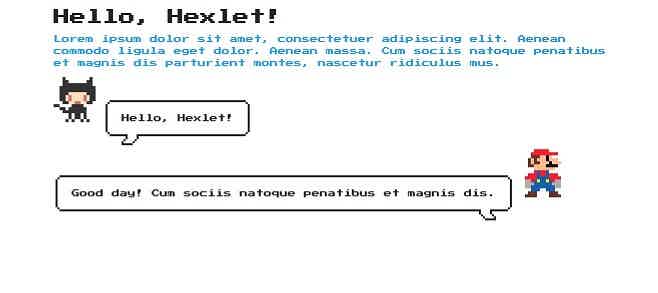\n\nФреймворк NES.css можно подключить к проекту с помощью npm или Yarn, а также через CDN. Подробную информацию смотрите в [репозитории фреймворка](https://github.com/nostalgic-css/NES.css) на GitHub. \n\n::programs\n\n## 2. Сироты и вдовы в CSS (orphans and widows CSS)\nПонятия «сироты» и «вдовы» пришло в CSS из типографской практики. Сирота — строка абзаца, которая перенеслась на новую страницу или колонку. Вдова — слово или строка из нескольких слов в конце страницы. Сироты и вдовы также называют висячими строками. Пример можно увидеть на иллюстрации. \n\n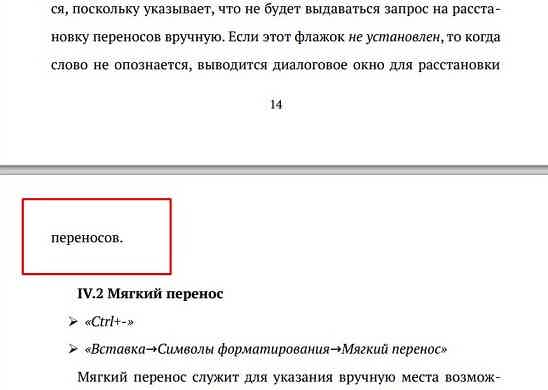\n\nСироты и вдовы ухудшают читабельность текста и уменьшают визуальную привлекательность страницы. \nВ вебе проблема сирот и вдов решается с помощью CSS-свойств ```orphans``` и ```widows```. \n\nСвойство ```orphans``` применяется к блочным элементам, например, ```p``` или ```div```. Определяет количество строк абзаца, которые должны остаться на предыдущей странице. \n\n```css\ndiv {\n orphans: 3;\n}\n```\n\nСвойство ```widows``` также применяется к блочным элементам. Определяет количество строк абзаца, которые переносятся на новую страницу. \n\n```css\ndiv {\n widows: 3;\n}\n```\n\nОбратите внимание, Firefox не поддерживает свойства ```orphans``` и ```widows```. Поддержку в других браузерах можно проверить с помощью сервиса Can I use: [```orphans```](https://caniuse.com/#search=orphans) и [```widows```](https://caniuse.com/#search=widows). Свойства ```orphans``` и ```widows``` входят в число [Paged media](https://developer.mozilla.org/en-US/docs/Web/CSS/Paged_Media), которые определяют внешний вид веб-страницы для печати.\n\n## 3. Селекторы атрибутов \nПочти все начинающие верстальщики знают, что к элементам можно обращаться через классы, идентификаторы и теги. Опытные специалисты применяют ещё и селекторы атрибутов.\n \nОчень простой практический пример: с помощью селектора по атрибуту можно выделить на сайте все страницы с пустым атрибутом ```alt```. \n\n```css\nimg[alt=\"\"] {\n\tborder: 3px dotted red;\n}\n```\n\nЭто может пригодиться для внутренней оптимизации сайта: быстрого поиска фото с незаполненным атрибутом ```alt```. \n\n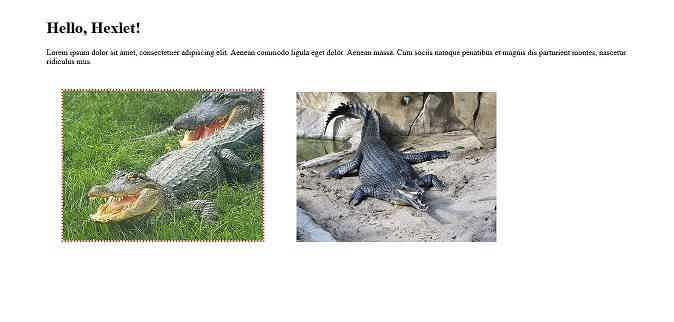\n\nВот пара практических примеров использования. С помощью селектора по атрибуту ```href``` можно произвольно оформлять ссылки на конкретные сайты или страницы. Например, выделим ссылку красным цветом.\n\n```css\na[href=\"https://ru.hexlet.io/\"] {\n\tcolor: red;\n}\n```\n\n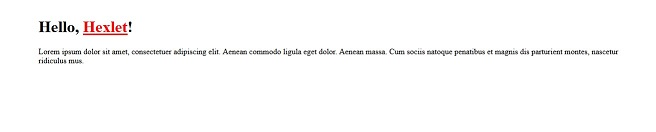\n\nСелекторы атрибутов удобно использовать для управления инпутами. Сделаем жёлтый фон в поле для ввода текста. \n\n```css\ninput[type=\"text\"] {\n\tbackground-color: yellow;\n}\n````\n\n\n\n## 4. Свойство border-image\nС помощью свойства ```border-image``` можно задать рамку элемента, в которой будет отображаться изображение. \n\n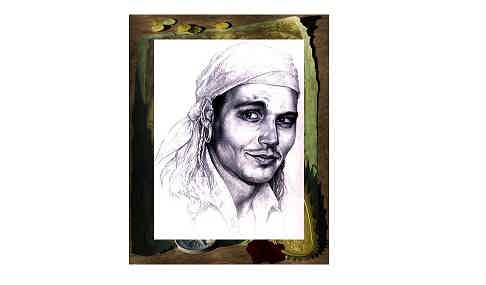\n\nСинтаксис такой:\n\n```css\n.jack-sparrow {\n\tborder: 50px solid transparent;\n\tborder-image-source: url(adventure.jpg);\n}\n```\n\nСвойство ```border``` задает рамку, которая будет отображаться, если изображения нет или его невозможно загрузить. Свойство ```border-image-source``` определяет источник изображения рамки. В нем можно указать URL изображения или CSS-градиент.\n \nОстальные свойства необязательные:\n* ```border-image-slice``` определяет смещение изображения в рамке.\n* ```border-image-width``` управляет толщиной рамки.\n* ```border-image-outset``` позволяет сдвинуть рамку за пределы элемента.\n* ```border-image-repeat``` контролирует повторение изображения в рамке.\n\nЧтобы сделать градиентную рамку, укажите градиент в свойстве ```border-image-source```.\n\n```css\n.jack-sparrow {\n\tborder: 50px solid transparent;\n\tborder-image-source: linear-gradient(yellow, red);\n\tborder-image-slice: 9;\n}\n```\n\n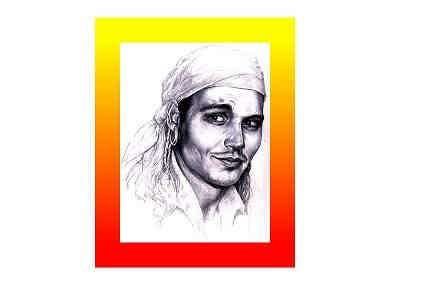\n\nСвойство ```border-image``` поддерживают [основные современные браузеры](https://caniuse.com/#search=border-image). Подробнее об использовании свойства читайте [в справочнике MDN](https://developer.mozilla.org/en-US/docs/Web/CSS/border-image).\n\n## 5. List-style-image vs. background-image (добавляем изображения в качестве маркеров списка)\nЗадать изображение в качестве маркера списка можно с помощью свойства ```list-style-image```.\n\n```css\nul {\n list-style-image: url(smile.png);\n}\n```\n\nНо при таком подходе появляется проблема: маркеры вертикально смещаются относительно элементов списка. \n\n\n\nВыравнивание с помощью ```vertical-align``` в этом случае не работает. Поэтому изображения в качестве маркеров списка удобнее задавать с помощью ```background-image```. \n\nСначала обнуляем отображение маркеров.\n\n```css\nul {\n list-style-type: none;\n}\n```\n\nТеперь добавляем фоновое изображение к элементам списка.\n\n```css\nli {\n background-image: url(smile.png);\n background-repeat: no-repeat;\n line-height: 30px;\n padding-left: 35px;\n}\n```\n\nВ свойстве ```background-image``` указан URL изображения, свойство ```background-repeat``` в данном случае отменяет повторение фонового изображения. Свойство ```line-height``` задает высоту строки. Этот показатель должен коррелировать с размером фонового изображения. Свойство ```padding-left``` позиционирует текст относительно фонового изображения.\n\n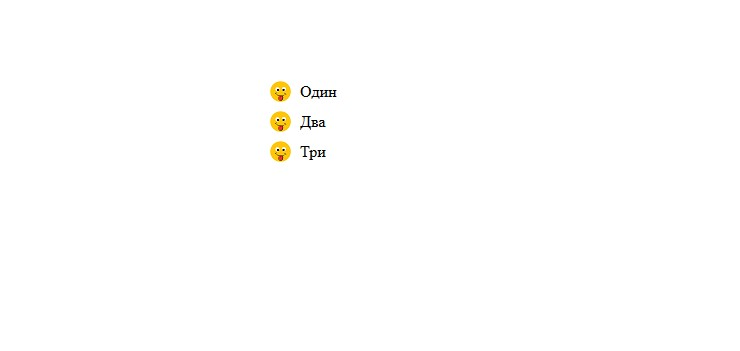\n\n## 6. Добавляем расшифровку аббревиатуры\nОчень простой инструмент, с помощью которого удобно расшифровывать акронимы и аббревиатуры в тексте. \n\nСправка: аббревиатура — слово, образованное из первых букв нескольких слов, например, США; акроним — вид аббревиатуры, который произносится слитно, а не по буквам, например, комсомол. \nЗадать расшифровку для аббревиатуры можно с помощью тега ```abbr```.\n\n```html\n<abbr title='Соединённые Штаты Америки'>США</abbr>\n```\n\nТег добавляет к тексту подсказку, которая всплывает при наведении курсора. \n\n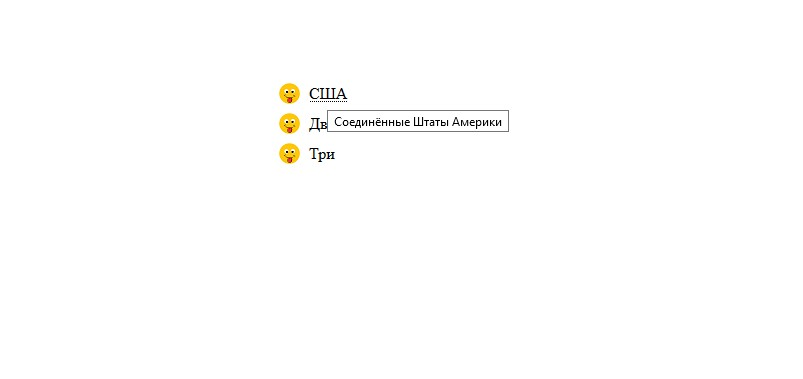\n\nТочно так же работает тег ```acronym```. Но он считается устаревшим, поэтому поддержка во всех браузерах не гарантируется. Предпочтительно всегда использовать тег ```abbr```. \n\n```html\n<acronym title='коммунистический союз молодежи'>Комсомол</acronym>\n```\n\n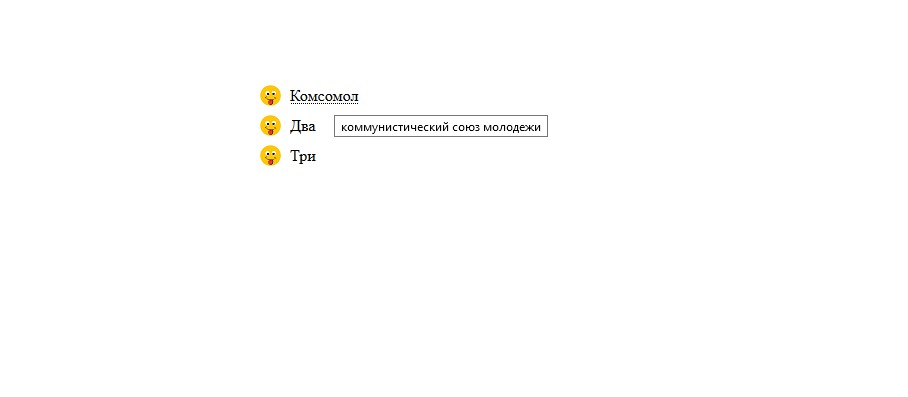\n\n::posts\n\n## 7. Трансформация изображений\nСвойство ```transform``` применяется к разным элементам страницы. Но чаще всего его используют для работы с изображениями. Например, ```transform: rotate()``` позволяет повернуть фотографию. Это может потребоваться при верстке сложных макетов.\n\n```css\nimg {\n transform: rotate(15deg);\n}\n```\n\n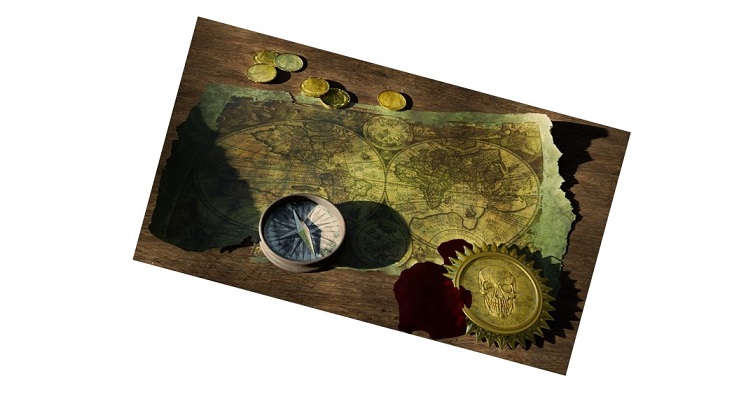\n\nСвойство ```transform: skewX()``` наклоняет изображение на заданный градус по вертикали. \n\n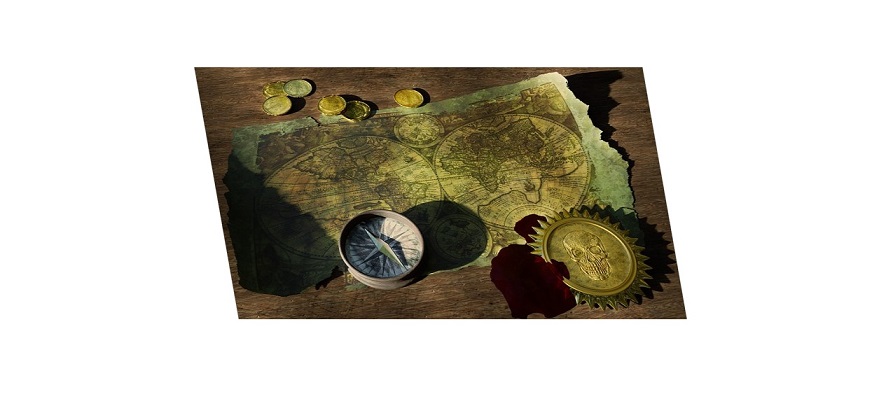\n\n```css\nimg {\n transform: skewX(10deg);\n}\n```\n\nСвойство ```transform: skewY()``` наклоняет изображение на заданный градус по горизонтали. \n\n\n\nСвойства ```transform: translateX()``` и ```transform: translateY()``` сдвигают изображение на заданное число пикселей по вертикали и горизонтали. \n\nСовременные браузеры [поддерживают свойство transform](https://caniuse.com/#search=transform). Подробную документацию смотрите [в справочнике MDN](https://developer.mozilla.org/en-US/docs/Web/CSS/transform).\n___\nПодборка необычных инструментов вёрстки остается открытой. Пишите в комментариях о необычных приёмах и техниках, с которыми вы сталкивались во время обучения или работы. \n\n \n\n \n\n\n\n\n\n \n\n\n\n","reading_time":3,"url":"https://ru.hexlet.io/blog/posts/selektory-atributov-nostalgicheskiy-freymvork-siroty-i-vdovy-7-neobychnyh-priyomov-i-instrumentov-html-css","cover_thumb_variant":null,"cover_list_variant":"/vite/assets/blog_post-7eTyeLLt.webp","cover_main_variant":"/vite/assets/blog_post-7eTyeLLt.webp","related_stacks_count":5},"relatedPosts":[{"model_name":"BlogPost","id":12,"title":"Среды разработки: какие они бывают и чем отличаются друг от друга","slug":"environment","summary":"Сооснователь Хекслета Кирилл Мокевнин рассказывает, какие бывают среды разработки, как проводится контроль и испытание фичи и что такое интеграция.","created_at":"2016-08-23T14:10:57.533Z","published_at":"2023-03-21T13:40:16.878Z","cover_list_variant":"/vite/assets/blog_post-7eTyeLLt.webp"},{"model_name":"BlogPost","id":2,"title":"10 советов, как более эффективно учиться в Хекслете","slug":"10-sovetov-o-tom-kak-bolee-effectivno-uchitsya-na-hexlet","summary":"Делимся десятью лайфхаками, которые повысят эффективность обучения на Хекслете.","created_at":"2016-07-29T16:52:44.532Z","published_at":"2022-11-07T14:23:05.569Z","cover_list_variant":"/vite/assets/blog_post-7eTyeLLt.webp"},{"model_name":"BlogPost","id":129,"title":"Как работать с командной строкой эффективно: 6 советов от разработчика Дейва Керра","slug":"effective_shell_navigation","summary":"Чем больше программист работает в командной строке, тем сложнее ему ориентироваться в тексте и командах. Мы перевели статью разработчика Дейва Керра и узнали, как с помощью сочетаний клавиш (шорткатов) упростить навигацию и поиск в командной строке.","created_at":"2017-07-03T09:54:55.442Z","published_at":"2022-10-28T10:49:59.501Z","cover_list_variant":"/vite/assets/blog_post-7eTyeLLt.webp"}],"category":{"id":4,"name":"Код","slug":"code","state":"published","created_at":"2016-08-23T13:33:44.258Z"},"mainStackCategory":{"id":2,"name":"Курсы по веб-разработке","slug":"web_development","short_name":"Веб-разработка","order":190,"state":"published","category_slug":"courses_web_development"},"categories":[{"id":6,"name":"Мотивация","slug":"motivation","state":"published","created_at":"2016-10-06T18:31:38.903Z"},{"id":3,"name":"Истории успеха","slug":"success","state":"published","created_at":"2016-07-30T12:57:18.308Z"},{"id":14,"name":"Дневник студента","slug":"student-diary","state":"published","created_at":"2019-02-25T13:27:09.471Z"},{"id":4,"name":"Код","slug":"code","state":"published","created_at":"2016-08-23T13:33:44.258Z"},{"id":12,"name":"Карьера","slug":"career","state":"published","created_at":"2017-07-21T15:42:21.481Z"}],"relatedLandings":[{"stack":{"id":19,"slug":"layout-designer","title":"Профессиональная верстка","audience":"for_beginners","start_type":"anytime","pricing_model":"purchase","priority":"medium","kind":"track","state":"published","stack_state":"finished","order":1700,"duration_in_months":5},"id":26,"slug":"professional-layout","title":"Профессиональная верстка","subtitle":"Навык адаптивной вёрстки с современными подходами для корректного отображения сайтов на любых устройствах и разрешениях","subtitle_for_lists":"Адаптивная вёрстка для отображения на любых устройствах ","locale":"ru","current":true,"duration_in_months_text":"5 месяцев","stack_slug":"layout-designer","price_text":"от 3 900 ₽","duration_text":"5 месяцев","cover_list_variant":"https://hexlet.io/rails/active_storage/representations/proxy/eyJfcmFpbHMiOnsiZGF0YSI6NDAzNCwicHVyIjoiYmxvYl9pZCJ9fQ==--ba516ea9573bdfcd1d21e2aa0fff8818561828f2/eyJfcmFpbHMiOnsiZGF0YSI6eyJmb3JtYXQiOiJ3ZWJwIiwicmVzaXplX3RvX2xpbWl0IjpbNDAwLDQwMF0sInNhdmVyIjp7InF1YWxpdHkiOjg1fX0sInB1ciI6InZhcmlhdGlvbiJ9fQ==--5b6f46dacd1af664f27558553a58076185091823/Typing-bro.png"},{"stack":{"id":41,"slug":"layout-designer-positioning","title":"Позиционирование в CSS","audience":"for_programmers","start_type":"anytime","pricing_model":"subscription","priority":"medium","kind":"track","state":"published","stack_state":"finished","order":4800,"duration_in_months":1},"id":70,"slug":"layout-designer-positioning","title":"Позиционирование в CSS","subtitle":"Навык разработки адаптивных интерфейсов, позволяющий создавать удобные и функциональные решения для различных устройств","subtitle_for_lists":"Получите навык работы с CSS и адаптивными интерфейсами","locale":"ru","current":true,"duration_in_months_text":"1 месяц","stack_slug":"layout-designer-positioning","price_text":"от 3 900 ₽","duration_text":"1 месяц","cover_list_variant":"https://hexlet.io/rails/active_storage/representations/proxy/eyJfcmFpbHMiOnsiZGF0YSI6NDAwNCwicHVyIjoiYmxvYl9pZCJ9fQ==--43a2eb3595eeebb3357d478cbcb752d0026363de/eyJfcmFpbHMiOnsiZGF0YSI6eyJmb3JtYXQiOiJ3ZWJwIiwicmVzaXplX3RvX2xpbWl0IjpbNDAwLDQwMF0sInNhdmVyIjp7InF1YWxpdHkiOjg1fX0sInB1ciI6InZhcmlhdGlvbiJ9fQ==--5b6f46dacd1af664f27558553a58076185091823/Website%20Creator-cuate.png"},{"stack":{"id":114,"slug":"css-animation","title":"Анимация CSS","audience":"for_programmers","start_type":"anytime","pricing_model":"subscription","priority":"medium","kind":"track","state":"published","stack_state":"finished","order":2900,"duration_in_months":1},"id":185,"slug":"css-animation","title":"Анимация CSS","subtitle":"Анимации в вебе: как использовать CSS и JavaScript для создания плавных эффектов","subtitle_for_lists":"Освоите CSS-анимации для улучшения UX","locale":"ru","current":true,"duration_in_months_text":"1 месяц","stack_slug":"css-animation","price_text":"от 3 900 ₽","duration_text":"1 месяц","cover_list_variant":"https://hexlet.io/rails/active_storage/representations/proxy/eyJfcmFpbHMiOnsiZGF0YSI6NDAyNSwicHVyIjoiYmxvYl9pZCJ9fQ==--3b94875bb52777724a7b11b075b8891f331d8cdf/eyJfcmFpbHMiOnsiZGF0YSI6eyJmb3JtYXQiOiJ3ZWJwIiwicmVzaXplX3RvX2xpbWl0IjpbNDAwLDQwMF0sInNhdmVyIjp7InF1YWxpdHkiOjg1fX0sInB1ciI6InZhcmlhdGlvbiJ9fQ==--5b6f46dacd1af664f27558553a58076185091823/Programming-amico.png"},{"stack":{"id":133,"slug":"sass","title":"SASS","audience":"for_programmers","start_type":"anytime","pricing_model":"subscription","priority":"medium","kind":"track","state":"published","stack_state":"finished","order":2000,"duration_in_months":1},"id":226,"slug":"sass","title":"SASS","subtitle":"Навык работы с препроцессором SASS для эффективной и структурированной стилизации веб-приложений","subtitle_for_lists":"Освоите препроцессор SASS и стилизацию веб-приложений","locale":"ru","current":true,"duration_in_months_text":"1 месяц","stack_slug":"sass","price_text":"от 3 900 ₽","duration_text":"1 месяц","cover_list_variant":"https://hexlet.io/rails/active_storage/representations/proxy/eyJfcmFpbHMiOnsiZGF0YSI6NDAyMiwicHVyIjoiYmxvYl9pZCJ9fQ==--8e763c5a65cfc8d5e67cb29ae3d1881ad23c714e/eyJfcmFpbHMiOnsiZGF0YSI6eyJmb3JtYXQiOiJ3ZWJwIiwicmVzaXplX3RvX2xpbWl0IjpbNDAwLDQwMF0sInNhdmVyIjp7InF1YWxpdHkiOjg1fX0sInB1ciI6InZhcmlhdGlvbiJ9fQ==--5b6f46dacd1af664f27558553a58076185091823/Hand%20coding-bro.png"},{"stack":{"id":12,"slug":"frontend","title":"Фронтенд-разработчик","audience":"for_beginners","start_type":"weekly","pricing_model":"purchase","priority":"high","kind":"profession","state":"published","stack_state":"finished","order":20,"duration_in_months":10},"id":17,"slug":"frontend","title":"Фронтенд-разработчик","subtitle":"Изучите HTML, CSS, JavaScript и React","subtitle_for_lists":"Изучите HTML, CSS, JavaScript и React","locale":"ru","current":true,"duration_in_months_text":"10 месяцев","stack_slug":"frontend","price_text":"от 6 792 ₽","duration_text":"10 месяцев","cover_list_variant":"https://hexlet.io/rails/active_storage/representations/proxy/eyJfcmFpbHMiOnsiZGF0YSI6MzcyNywicHVyIjoiYmxvYl9pZCJ9fQ==--2d5cbbf5c3b4a73ae4b2c50632305d78f5872e4d/eyJfcmFpbHMiOnsiZGF0YSI6eyJmb3JtYXQiOiJ3ZWJwIiwicmVzaXplX3RvX2xpbWl0IjpbNDAwLDQwMF0sInNhdmVyIjp7InF1YWxpdHkiOjg1fX0sInB1ciI6InZhcmlhdGlvbiJ9fQ==--5b6f46dacd1af664f27558553a58076185091823/Programmer-rafiki.png"}]},"url":"/blog/posts/selektory-atributov-nostalgicheskiy-freymvork-siroty-i-vdovy-7-neobychnyh-priyomov-i-instrumentov-html-css","version":"0b0c6d4ebbd40fd58630a0dd89cc25544ccdf24e","encryptHistory":false,"clearHistory":false}"><style data-mantine-styles="true">:root, :host{--mantine-font-family: Arial, sans-serif;--mantine-font-family-headings: Arial, sans-serif;--mantine-heading-font-weight: normal;--mantine-radius-default: 0rem;--mantine-primary-color-filled: var(--mantine-color-indigo-filled);--mantine-primary-color-filled-hover: var(--mantine-color-indigo-filled-hover);--mantine-primary-color-light: var(--mantine-color-indigo-light);--mantine-primary-color-light-hover: var(--mantine-color-indigo-light-hover);--mantine-primary-color-light-color: var(--mantine-color-indigo-light-color);--mantine-spacing-xxl: calc(4rem * var(--mantine-scale));--mantine-font-size-xs: 12px;--mantine-font-size-sm: 14px;--mantine-font-size-md: 16px;--mantine-font-size-lg: clamp(16.0000px, calc(15.2727px + 0.2273vw), 18.0000px);--mantine-font-size-xl: clamp(16.0000px, calc(14.5455px + 0.4545vw), 20.0000px);--mantine-font-size-display-3: clamp(32.0000px, calc(26.1818px + 1.8182vw), 48.0000px);--mantine-font-size-display-2: clamp(36.0000px, calc(25.8182px + 3.1818vw), 64.0000px);--mantine-font-size-display-1: clamp(40.0000px, calc(25.4545px + 4.5455vw), 80.0000px);--mantine-font-size-h1: clamp(28.0000px, calc(23.6364px + 1.3636vw), 40.0000px);--mantine-font-size-h2: clamp(24.0000px, calc(21.0909px + 0.9091vw), 32.0000px);--mantine-font-size-h3: clamp(20.0000px, calc(17.0909px + 0.9091vw), 28.0000px);--mantine-font-size-h4: clamp(16.0000px, calc(13.0909px + 0.9091vw), 24.0000px);--mantine-font-size-h5: clamp(16.0000px, calc(14.5455px + 0.4545vw), 20.0000px);--mantine-font-size-h6: 1rem;--mantine-primary-color-0: var(--mantine-color-indigo-0);--mantine-primary-color-1: var(--mantine-color-indigo-1);--mantine-primary-color-2: var(--mantine-color-indigo-2);--mantine-primary-color-3: var(--mantine-color-indigo-3);--mantine-primary-color-4: var(--mantine-color-indigo-4);--mantine-primary-color-5: var(--mantine-color-indigo-5);--mantine-primary-color-6: var(--mantine-color-indigo-6);--mantine-primary-color-7: var(--mantine-color-indigo-7);--mantine-primary-color-8: var(--mantine-color-indigo-8);--mantine-primary-color-9: var(--mantine-color-indigo-9);--mantine-color-red-0: #ffeaea;--mantine-color-red-1: #fed4d4;--mantine-color-red-2: #f4a7a8;--mantine-color-red-3: #ec7878;--mantine-color-red-4: #e55050;--mantine-color-red-5: #e03131;--mantine-color-red-6: #e02829;--mantine-color-red-7: #c71a1c;--mantine-color-red-8: #b21218;--mantine-color-red-9: #9c0411;--mantine-color-violet-0: #fce9ff;--mantine-color-violet-1: #f1cfff;--mantine-color-violet-2: #e09bff;--mantine-color-violet-3: #d16fff;--mantine-color-violet-4: #be37fe;--mantine-color-violet-5: #b51afe;--mantine-color-violet-6: #b009ff;--mantine-color-violet-7: #9b00e4;--mantine-color-violet-8: #8a00cc;--mantine-color-violet-9: #7800b3;--mantine-color-indigo-0: #edecff;--mantine-color-indigo-1: #d6d5fe;--mantine-color-indigo-2: #aaa9f4;--mantine-color-indigo-3: #7b79eb;--mantine-color-indigo-4: #5451e4;--mantine-color-indigo-5: #3b37e0;--mantine-color-indigo-6: #2d2adf;--mantine-color-indigo-7: #1f1ec7;--mantine-color-indigo-8: #1819b2;--mantine-color-indigo-9: #0c149e;--mantine-color-cyan-0: #dffdff;--mantine-color-cyan-1: #caf5ff;--mantine-color-cyan-2: #99e8ff;--mantine-color-cyan-3: #64daff;--mantine-color-cyan-4: #3ccffe;--mantine-color-cyan-5: #24c8fe;--mantine-color-cyan-6: #00c2ff;--mantine-color-cyan-7: #00ade4;--mantine-color-cyan-8: #009acd;--mantine-color-cyan-9: #0085b5;--mantine-color-green-0: #e9fdec;--mantine-color-green-1: #d7f6dc;--mantine-color-green-2: #b0eab9;--mantine-color-green-3: #86df94;--mantine-color-green-4: #62d574;--mantine-color-green-5: #4ccf5f;--mantine-color-green-6: #3fcc54;--mantine-color-green-7: #2fb344;--mantine-color-green-8: #25a03b;--mantine-color-green-9: #138a2e;--mantine-color-yellow-0: #fff7e2;--mantine-color-yellow-1: #ffeecd;--mantine-color-yellow-2: #ffdc9c;--mantine-color-yellow-3: #ffc966;--mantine-color-yellow-4: #feb93a;--mantine-color-yellow-5: #feae1e;--mantine-color-yellow-6: #ffa90f;--mantine-color-yellow-8: #ca8200;--mantine-color-yellow-9: #af7000;--mantine-h1-font-size: clamp(28.0000px, calc(23.6364px + 1.3636vw), 40.0000px);--mantine-h1-font-weight: normal;--mantine-h2-font-size: clamp(24.0000px, calc(21.0909px + 0.9091vw), 32.0000px);--mantine-h2-font-weight: normal;--mantine-h3-font-size: clamp(20.0000px, calc(17.0909px + 0.9091vw), 28.0000px);--mantine-h3-font-weight: normal;--mantine-h4-font-size: clamp(16.0000px, calc(13.0909px + 0.9091vw), 24.0000px);--mantine-h4-font-weight: normal;--mantine-h5-font-size: clamp(16.0000px, calc(14.5455px + 0.4545vw), 20.0000px);--mantine-h5-font-weight: normal;--mantine-h6-font-size: 1rem;--mantine-h6-font-weight: normal;}
:root[data-mantine-color-scheme="dark"], :host([data-mantine-color-scheme="dark"]){--mantine-color-anchor: var(--mantine-color-text);--mantine-color-dimmed: #495057;--mantine-color-dark-filled: var(--mantine-color-dark-5);--mantine-color-dark-filled-hover: var(--mantine-color-dark-6);--mantine-color-dark-light: rgba(105, 105, 105, 0.15);--mantine-color-dark-light-hover: rgba(105, 105, 105, 0.2);--mantine-color-dark-light-color: var(--mantine-color-dark-0);--mantine-color-dark-outline: var(--mantine-color-dark-1);--mantine-color-dark-outline-hover: rgba(184, 184, 184, 0.05);--mantine-color-gray-filled: var(--mantine-color-gray-5);--mantine-color-gray-filled-hover: var(--mantine-color-gray-6);--mantine-color-gray-light: rgba(222, 226, 230, 0.15);--mantine-color-gray-light-hover: rgba(222, 226, 230, 0.2);--mantine-color-gray-light-color: var(--mantine-color-gray-0);--mantine-color-gray-outline: var(--mantine-color-gray-1);--mantine-color-gray-outline-hover: rgba(241, 243, 245, 0.05);--mantine-color-red-filled: var(--mantine-color-red-5);--mantine-color-red-filled-hover: var(--mantine-color-red-6);--mantine-color-red-light: rgba(236, 120, 120, 0.15);--mantine-color-red-light-hover: rgba(236, 120, 120, 0.2);--mantine-color-red-light-color: var(--mantine-color-red-0);--mantine-color-red-outline: var(--mantine-color-red-1);--mantine-color-red-outline-hover: rgba(254, 212, 212, 0.05);--mantine-color-pink-filled: var(--mantine-color-pink-5);--mantine-color-pink-filled-hover: var(--mantine-color-pink-6);--mantine-color-pink-light: rgba(250, 162, 193, 0.15);--mantine-color-pink-light-hover: rgba(250, 162, 193, 0.2);--mantine-color-pink-light-color: var(--mantine-color-pink-0);--mantine-color-pink-outline: var(--mantine-color-pink-1);--mantine-color-pink-outline-hover: rgba(255, 222, 235, 0.05);--mantine-color-grape-filled: var(--mantine-color-grape-5);--mantine-color-grape-filled-hover: var(--mantine-color-grape-6);--mantine-color-grape-light: rgba(229, 153, 247, 0.15);--mantine-color-grape-light-hover: rgba(229, 153, 247, 0.2);--mantine-color-grape-light-color: var(--mantine-color-grape-0);--mantine-color-grape-outline: var(--mantine-color-grape-1);--mantine-color-grape-outline-hover: rgba(243, 217, 250, 0.05);--mantine-color-violet-filled: var(--mantine-color-violet-5);--mantine-color-violet-filled-hover: var(--mantine-color-violet-6);--mantine-color-violet-light: rgba(209, 111, 255, 0.15);--mantine-color-violet-light-hover: rgba(209, 111, 255, 0.2);--mantine-color-violet-light-color: var(--mantine-color-violet-0);--mantine-color-violet-outline: var(--mantine-color-violet-1);--mantine-color-violet-outline-hover: rgba(241, 207, 255, 0.05);--mantine-color-indigo-filled: var(--mantine-color-indigo-5);--mantine-color-indigo-filled-hover: var(--mantine-color-indigo-6);--mantine-color-indigo-light: rgba(123, 121, 235, 0.15);--mantine-color-indigo-light-hover: rgba(123, 121, 235, 0.2);--mantine-color-indigo-light-color: var(--mantine-color-indigo-0);--mantine-color-indigo-outline: var(--mantine-color-indigo-1);--mantine-color-indigo-outline-hover: rgba(214, 213, 254, 0.05);--mantine-color-blue-filled: var(--mantine-color-blue-5);--mantine-color-blue-filled-hover: var(--mantine-color-blue-6);--mantine-color-blue-light: rgba(116, 192, 252, 0.15);--mantine-color-blue-light-hover: rgba(116, 192, 252, 0.2);--mantine-color-blue-light-color: var(--mantine-color-blue-0);--mantine-color-blue-outline: var(--mantine-color-blue-1);--mantine-color-blue-outline-hover: rgba(208, 235, 255, 0.05);--mantine-color-cyan-filled: var(--mantine-color-cyan-5);--mantine-color-cyan-filled-hover: var(--mantine-color-cyan-6);--mantine-color-cyan-light: rgba(100, 218, 255, 0.15);--mantine-color-cyan-light-hover: rgba(100, 218, 255, 0.2);--mantine-color-cyan-light-color: var(--mantine-color-cyan-0);--mantine-color-cyan-outline: var(--mantine-color-cyan-1);--mantine-color-cyan-outline-hover: rgba(202, 245, 255, 0.05);--mantine-color-teal-filled: var(--mantine-color-teal-5);--mantine-color-teal-filled-hover: var(--mantine-color-teal-6);--mantine-color-teal-light: rgba(99, 230, 190, 0.15);--mantine-color-teal-light-hover: rgba(99, 230, 190, 0.2);--mantine-color-teal-light-color: var(--mantine-color-teal-0);--mantine-color-teal-outline: var(--mantine-color-teal-1);--mantine-color-teal-outline-hover: rgba(195, 250, 232, 0.05);--mantine-color-green-filled: var(--mantine-color-green-5);--mantine-color-green-filled-hover: var(--mantine-color-green-6);--mantine-color-green-light: rgba(134, 223, 148, 0.15);--mantine-color-green-light-hover: rgba(134, 223, 148, 0.2);--mantine-color-green-light-color: var(--mantine-color-green-0);--mantine-color-green-outline: var(--mantine-color-green-1);--mantine-color-green-outline-hover: rgba(215, 246, 220, 0.05);--mantine-color-lime-filled: var(--mantine-color-lime-5);--mantine-color-lime-filled-hover: var(--mantine-color-lime-6);--mantine-color-lime-light: rgba(192, 235, 117, 0.15);--mantine-color-lime-light-hover: rgba(192, 235, 117, 0.2);--mantine-color-lime-light-color: var(--mantine-color-lime-0);--mantine-color-lime-outline: var(--mantine-color-lime-1);--mantine-color-lime-outline-hover: rgba(233, 250, 200, 0.05);--mantine-color-yellow-filled: var(--mantine-color-yellow-5);--mantine-color-yellow-filled-hover: var(--mantine-color-yellow-6);--mantine-color-yellow-light: rgba(255, 201, 102, 0.15);--mantine-color-yellow-light-hover: rgba(255, 201, 102, 0.2);--mantine-color-yellow-light-color: var(--mantine-color-yellow-0);--mantine-color-yellow-outline: var(--mantine-color-yellow-1);--mantine-color-yellow-outline-hover: rgba(255, 238, 205, 0.05);--mantine-color-orange-filled: var(--mantine-color-orange-5);--mantine-color-orange-filled-hover: var(--mantine-color-orange-6);--mantine-color-orange-light: rgba(255, 192, 120, 0.15);--mantine-color-orange-light-hover: rgba(255, 192, 120, 0.2);--mantine-color-orange-light-color: var(--mantine-color-orange-0);--mantine-color-orange-outline: var(--mantine-color-orange-1);--mantine-color-orange-outline-hover: rgba(255, 232, 204, 0.05);--app-cta-gradient: linear-gradient(90deg, var(--mantine-color-blue-9) 0%, var(--mantine-color-cyan-7) 100%);--app-color-surface: #2e2e2e;}
:root[data-mantine-color-scheme="light"], :host([data-mantine-color-scheme="light"]){--mantine-color-anchor: var(--mantine-color-text);--mantine-color-dimmed: #495057;--mantine-color-red-light: rgba(224, 40, 41, 0.1);--mantine-color-red-light-hover: rgba(224, 40, 41, 0.12);--mantine-color-red-outline-hover: rgba(224, 40, 41, 0.05);--mantine-color-violet-light: rgba(176, 9, 255, 0.1);--mantine-color-violet-light-hover: rgba(176, 9, 255, 0.12);--mantine-color-violet-outline-hover: rgba(176, 9, 255, 0.05);--mantine-color-indigo-light: rgba(45, 42, 223, 0.1);--mantine-color-indigo-light-hover: rgba(45, 42, 223, 0.12);--mantine-color-indigo-outline-hover: rgba(45, 42, 223, 0.05);--mantine-color-cyan-light: rgba(0, 194, 255, 0.1);--mantine-color-cyan-light-hover: rgba(0, 194, 255, 0.12);--mantine-color-cyan-outline-hover: rgba(0, 194, 255, 0.05);--mantine-color-green-light: rgba(63, 204, 84, 0.1);--mantine-color-green-light-hover: rgba(63, 204, 84, 0.12);--mantine-color-green-outline-hover: rgba(63, 204, 84, 0.05);--mantine-color-yellow-light: rgba(255, 169, 15, 0.1);--mantine-color-yellow-light-hover: rgba(255, 169, 15, 0.12);--mantine-color-yellow-outline-hover: rgba(255, 169, 15, 0.05);--app-color-surface: #f1f3f5;--app-cta-gradient: linear-gradient(90deg, var(--mantine-color-blue-filled) 0%, var(--mantine-color-cyan-5) 100%);}</style><style data-mantine-styles="classes">@media (max-width: 35.99375em) {.mantine-visible-from-xs {display: none !important;}}@media (min-width: 36em) {.mantine-hidden-from-xs {display: none !important;}}@media (max-width: 47.99375em) {.mantine-visible-from-sm {display: none !important;}}@media (min-width: 48em) {.mantine-hidden-from-sm {display: none !important;}}@media (max-width: 61.99375em) {.mantine-visible-from-md {display: none !important;}}@media (min-width: 62em) {.mantine-hidden-from-md {display: none !important;}}@media (max-width: 74.99375em) {.mantine-visible-from-lg {display: none !important;}}@media (min-width: 75em) {.mantine-hidden-from-lg {display: none !important;}}@media (max-width: 87.99375em) {.mantine-visible-from-xl {display: none !important;}}@media (min-width: 88em) {.mantine-hidden-from-xl {display: none !important;}}</style><script type="application/ld+json">{"@context":"https://schema.org","@type":"Article","author":"Дмитрий Дементий","name":"Селекторы атрибутов, ностальгический фреймворк, сироты и вдовы: 7 необычных приёмов и инструментов HTML/CSS","datePublished":"2019-06-14T14:19:30.991Z","headline":"Эта статья для начинающих верстальщиков и будущих программистов. В ней вы найдёте несколько необычных и редких инструментов и приёмов HTML/CSS. ","image":"/vite/assets/blog_post-7eTyeLLt.webp","interactionStatistic":[{"@type":"InteractionCounter","interactionType":{"@type":"LikeAction"},"userInteractionCount":14}]}</script><div style="--container-size:var(--container-size-lg);margin-top:var(--mantine-spacing-xl);height:100%" class="m_7485cace mantine-Container-root" data-size="lg" data-strategy="block"><script type="application/ld+json">{"@context":"https://schema.org","@type":"BreadcrumbList","itemListElement":[{"position":1,"@type":"ListItem","item":{"@id":"/blog","name":"Блог Хекслета"}},{"position":2,"@type":"ListItem","item":{"@id":"/blog/categories/code","name":"Код"}},{"position":3,"@type":"ListItem","item":{"@id":"/blog/posts/selektory-atributov-nostalgicheskiy-freymvork-siroty-i-vdovy-7-neobychnyh-priyomov-i-instrumentov-html-css","name":"Селекторы атрибутов, ностальгический фреймворк, сироты и вдовы: 7 необычных приёмов и инструментов HTML/CSS"}}]}</script><div style="margin-bottom:var(--mantine-spacing-xs)" class="m_8b3717df mantine-Breadcrumbs-root"><a style="--text-fz:var(--mantine-font-size-sm);--text-lh:var(--mantine-line-height-sm);white-space:normal;color:inherit" class="mantine-focus-auto m_849cf0da m_f678d540 mantine-Breadcrumbs-breadcrumb m_b6d8b162 mantine-Text-root mantine-Anchor-root" data-size="sm" data-underline="hover" href="/"><div style="color:inherit" class="m_4451eb3a mantine-Center-root"><svg xmlns="http://www.w3.org/2000/svg" width="15" height="15" viewBox="0 0 24 24" fill="none" stroke="currentColor" stroke-width="2" stroke-linecap="round" stroke-linejoin="round" class="tabler-icon tabler-icon-home-link "><path d="M20.085 11.085l-8.085 -8.085l-9 9h2v7a2 2 0 0 0 2 2h4.5"></path><path d="M9 21v-6a2 2 0 0 1 2 -2h2a2 2 0 0 1 1.807 1.143"></path><path d="M20 21a1 1 0 1 0 2 0a1 1 0 1 0 -2 0"></path><path d="M20 16a1 1 0 1 0 2 0a1 1 0 1 0 -2 0"></path><path d="M15 19a1 1 0 1 0 2 0a1 1 0 1 0 -2 0"></path><path d="M21 16l-5 3l5 2"></path></svg></div></a><div class="m_3b8f2208 mantine-Breadcrumbs-separator">/</div><a style="--text-fz:var(--mantine-font-size-sm);--text-lh:var(--mantine-line-height-sm);white-space:normal;color:inherit" class="mantine-focus-auto m_849cf0da m_f678d540 mantine-Breadcrumbs-breadcrumb m_b6d8b162 mantine-Text-root mantine-Anchor-root" data-size="sm" data-underline="hover" href="/blog">Блог Хекслета</a><div class="m_3b8f2208 mantine-Breadcrumbs-separator">/</div><a style="--text-fz:var(--mantine-font-size-sm);--text-lh:var(--mantine-line-height-sm);white-space:normal;color:inherit" class="mantine-focus-auto m_849cf0da m_f678d540 mantine-Breadcrumbs-breadcrumb m_b6d8b162 mantine-Text-root mantine-Anchor-root" data-size="sm" data-underline="hover" href="/blog/categories/code">Код</a><div class="m_3b8f2208 mantine-Breadcrumbs-separator">/</div><p style="--text-fz:var(--mantine-font-size-sm);--text-lh:var(--mantine-line-height-sm);white-space:normal;color:var(--mantine-color-dimmed)" class="mantine-focus-auto m_f678d540 mantine-Breadcrumbs-breadcrumb m_b6d8b162 mantine-Text-root" data-size="sm">Селекторы атрибутов, ностальгический фреймворк, сироты и вдовы: 7 необычных приёмов и инструментов HTML/CSS</p></div><style data-mantine-styles="inline">.__m__-_R_eub_{margin-bottom:var(--mantine-spacing-xs);}@media(min-width: 36em){.__m__-_R_eub_{margin-bottom:var(--mantine-spacing-xs);}}</style><div style="--group-gap:var(--mantine-spacing-md);--group-align:center;--group-justify:space-between;--group-wrap:wrap" class="m_4081bf90 mantine-Group-root __m__-_R_eub_"><style data-mantine-styles="inline">.__m__-_R_deub_{width:100%;}@media(min-width: 36em){.__m__-_R_deub_{width:70%;}}@media(min-width: 75em){.__m__-_R_deub_{width:75%;}}</style><div class="__m__-_R_deub_"><div style="--group-gap:var(--mantine-spacing-md);--group-align:center;--group-justify:start;--group-wrap:nowrap" class="m_4081bf90 mantine-Group-root"><h1 style="--title-fw:var(--mantine-h1-font-weight);--title-lh:var(--mantine-h1-line-height);--title-fz:var(--mantine-h1-font-size)" class="m_8a5d1357 mantine-Title-root" data-order="1">Селекторы атрибутов, ностальгический фреймворк, сироты и вдовы: 7 необычных приёмов и инструментов HTML/CSS</h1></div></div></div><div style="position:absolute;top:calc(18.75rem * var(--mantine-scale))" class=""></div><style data-mantine-styles="inline">.__m__-_R_2iub_{--grid-gutter:var(--mantine-spacing-xl);}</style><div class="m_410352e9 mantine-Grid-root __m__-_R_2iub_"><div class="m_dee7bd2f mantine-Grid-inner"><style data-mantine-styles="inline">.__m__-_R_dmiub_{--col-flex-grow:auto;--col-flex-basis:100%;--col-max-width:100%;}@media(min-width: 48em){.__m__-_R_dmiub_{--col-flex-grow:auto;--col-flex-basis:83.33333333333334%;--col-max-width:83.33333333333334%;}}@media(min-width: 62em){.__m__-_R_dmiub_{--col-flex-grow:auto;--col-flex-basis:66.66666666666667%;--col-max-width:66.66666666666667%;}}</style><div class="m_96bdd299 mantine-Grid-col __m__-_R_dmiub_"><div style="--stack-gap:var(--mantine-spacing-md);--stack-align:stretch;--stack-justify:flex-start;margin-bottom:var(--mantine-spacing-xl)" class="m_6d731127 mantine-Stack-root"><div class=""><div style="--group-gap:var(--mantine-spacing-xs);--group-align:center;--group-justify:flex-start;--group-wrap:wrap;margin-bottom:var(--mantine-spacing-xl)" class="m_4081bf90 mantine-Group-root"><button style="--badge-height:var(--badge-height-sm);--badge-padding-x:var(--badge-padding-x-sm);--badge-fz:var(--badge-fz-sm);--badge-bg:var(--mantine-color-default);--badge-color:var(--mantine-color-default-color);--badge-bd:calc(0.0625rem * var(--mantine-scale)) solid var(--mantine-color-default-border);cursor:pointer;color:inherit" class="m_347db0ec mantine-Badge-root" data-variant="default" data-size="sm" type="button" aria-label="Фронтенд"><span class="m_5add502a mantine-Badge-label">Фронтенд</span></button></div><div style="--group-gap:calc(0.625rem * var(--mantine-scale));--group-align:center;--group-justify:flex-start;--group-wrap:wrap;margin-bottom:var(--mantine-spacing-sm);color:var(--mantine-color-gray-text)" class="m_4081bf90 mantine-Group-root"><div style="--group-gap:calc(0.1875rem * var(--mantine-scale));--group-align:center;--group-justify:flex-start;--group-wrap:wrap;margin-inline-end:var(--mantine-spacing-lg)" class="m_4081bf90 mantine-Group-root">14 июня 2019 г.</div><div style="--group-gap:calc(0.1875rem * var(--mantine-scale));--group-align:center;--group-justify:flex-start;--group-wrap:wrap" class="m_4081bf90 mantine-Group-root"><div style="--ti-size:var(--ti-size-xs);--ti-bg:transparent;--ti-color:var(--mantine-color-indigo-light-color);--ti-bd:calc(0.0625rem * var(--mantine-scale)) solid transparent;color:inherit" class="m_7341320d mantine-ThemeIcon-root" data-variant="transparent" data-size="xs"><svg xmlns="http://www.w3.org/2000/svg" width="24" height="24" viewBox="0 0 24 24" fill="none" stroke="currentColor" stroke-width="2" stroke-linecap="round" stroke-linejoin="round" class="tabler-icon tabler-icon-clock "><path d="M3 12a9 9 0 1 0 18 0a9 9 0 0 0 -18 0"></path><path d="M12 7v5l3 3"></path></svg></div>3 минуты</div><div style="--group-gap:calc(0.1875rem * var(--mantine-scale));--group-align:center;--group-justify:flex-start;--group-wrap:wrap" class="m_4081bf90 mantine-Group-root"><div style="--ti-size:var(--ti-size-xs);--ti-bg:transparent;--ti-color:var(--mantine-color-indigo-light-color);--ti-bd:calc(0.0625rem * var(--mantine-scale)) solid transparent;color:inherit" class="m_7341320d mantine-ThemeIcon-root" data-variant="transparent" data-size="xs"><svg xmlns="http://www.w3.org/2000/svg" width="24" height="24" viewBox="0 0 24 24" fill="none" stroke="currentColor" stroke-width="2" stroke-linecap="round" stroke-linejoin="round" class="tabler-icon tabler-icon-thumb-up "><path d="M7 11v8a1 1 0 0 1 -1 1h-2a1 1 0 0 1 -1 -1v-7a1 1 0 0 1 1 -1h3a4 4 0 0 0 4 -4v-1a2 2 0 0 1 4 0v5h3a2 2 0 0 1 2 2l-1 5a2 3 0 0 1 -2 2h-7a3 3 0 0 1 -3 -3"></path></svg></div>14</div></div><div style="--ar-ratio:2" class="m_71ac47fc mantine-AspectRatio-root"><img style="--image-radius:var(--mantine-radius-md);--image-object-fit:cover;width:100%;height:100%" class="m_9e117634 mantine-Image-root" src="/vite/assets/blog_post-7eTyeLLt.webp" alt="Селекторы атрибутов, ностальгический фреймворк, сироты и вдовы: 7 необычных приёмов и инструментов HTML/CSS"/></div></div><div role="link" tabindex="0" style="cursor:pointer"><button style="display:block;width:100%" class="mantine-focus-auto m_87cf2631 mantine-UnstyledButton-root" type="button" aria-label="Присоединяйтесь к нашему Telegram-сообществу"><div style="background-color:light-dark(var(--mantine-color-gray-1), var(--mantine-color-dark-6))" class="m_e615b15f mantine-Card-root m_1b7284a3 mantine-Paper-root"><div style="--group-gap:var(--mantine-spacing-md);--group-align:center;--group-justify:flex-start;--group-wrap:wrap" class="m_4081bf90 mantine-Group-root"><div style="--ti-bg:transparent;--ti-color:var(--mantine-color-indigo-light-color);--ti-bd:calc(0.0625rem * var(--mantine-scale)) solid transparent;margin-inline-end:auto;color:inherit" class="m_7341320d mantine-ThemeIcon-root" data-variant="transparent"><svg xmlns="http://www.w3.org/2000/svg" width="24" height="24" viewBox="0 0 24 24" fill="none" stroke="currentColor" stroke-width="1.2" stroke-linecap="round" stroke-linejoin="round" class="tabler-icon tabler-icon-brand-telegram "><path d="M15 10l-4 4l6 6l4 -16l-18 7l4 2l2 6l3 -4"></path></svg></div>Присоединяйтесь к нашему Telegram-сообществу</div></div></button></div><div style="margin-bottom:var(--mantine-spacing-xl)" class="m_d08caa0 mantine-Typography-root"><p>Практически каждый веб-разработчик регулярно или время от времени работает с вёрсткой. Эта статья для начинающих верстальщиков и будущих программистов. В ней вы найдёте несколько необычных и редких инструментов и приёмов HTML/CSS.</p>
<h2 id="heading-2-1">Содержание</h2>
<ul>
<li><a style="text-decoration:underline" class="mantine-focus-auto m_849cf0da m_b6d8b162 mantine-Text-root mantine-Anchor-root" data-underline="hover" href="#heading-2-2">1. Фреймворк NES.css</a></li>
<li><a style="text-decoration:underline" class="mantine-focus-auto m_849cf0da m_b6d8b162 mantine-Text-root mantine-Anchor-root" data-underline="hover" href="#heading-2-3">2. Сироты и вдовы в CSS (orphans and widows CSS)</a></li>
<li><a style="text-decoration:underline" class="mantine-focus-auto m_849cf0da m_b6d8b162 mantine-Text-root mantine-Anchor-root" data-underline="hover" href="#heading-2-4">3. Селекторы атрибутов</a></li>
<li><a style="text-decoration:underline" class="mantine-focus-auto m_849cf0da m_b6d8b162 mantine-Text-root mantine-Anchor-root" data-underline="hover" href="#heading-2-5">4. Свойство border-image</a></li>
<li><a style="text-decoration:underline" class="mantine-focus-auto m_849cf0da m_b6d8b162 mantine-Text-root mantine-Anchor-root" data-underline="hover" href="#heading-2-6">5. List-style-image vs. background-image (добавляем изображения в качестве маркеров списка)</a></li>
<li><a style="text-decoration:underline" class="mantine-focus-auto m_849cf0da m_b6d8b162 mantine-Text-root mantine-Anchor-root" data-underline="hover" href="#heading-2-7">6. Добавляем расшифровку аббревиатуры</a></li>
<li><a style="text-decoration:underline" class="mantine-focus-auto m_849cf0da m_b6d8b162 mantine-Text-root mantine-Anchor-root" data-underline="hover" href="#heading-2-8">7. Трансформация изображений</a></li>
</ul>
<h2 id="heading-2-2">1. Фреймворк NES.css</h2>
<p>Дети 90-х с ностальгией вспоминают 8-битную графику игр из консолей Nintendo. Видимо, японскому разработчику B.C.Rikko не хватает игрушек из прошлого. Он создал CSS-фреймворк NES.css, с помощью которого каждый желающий может стилизовать сайт или отдельную страницу под винтажную графику.</p>
<p><img style="--image-object-fit:contain;width:auto" class="m_9e117634 mantine-Image-root" src="https://ucarecdn.com/14b8a9e5-f45c-40e9-ba91-d76e022b9854/-/format/auto/-/quality/lightest/-/max_icc_size/10/" alt="пример оформления страницы с помощью NES.css" loading="lazy"/></p>
<p>Сложно представить деловой сайт с оформлением в стиле Nintendo. Тем не менее в фреймворке NES.css есть минимальный набор компонентов и инструментов, необходимых для создания полноценной страницы. Вот некоторые инструменты и возможности фреймворка:</p>
<ul>
<li>Классы для оформления текста.</li>
<li>Кнопки.</li>
<li>Селекторы (радио и выпадающие), чекбоксы.</li>
<li>Несколько вариантов полей для ввода (инпутов).</li>
<li>Контейнеры для оформления разделов страниц.</li>
<li>Списки и таблицы.</li>
<li>Индикаторы прогресса (прогресс-бары).</li>
<li>Значки, иконки.</li>
<li>Персонажи игр Nintendo.</li>
</ul>
<p>Обратите внимание, в фреймворке есть компоненты, но нет модульной сетки. Ее можно <a style="text-decoration:underline" class="mantine-focus-auto m_849cf0da m_b6d8b162 mantine-Text-root mantine-Anchor-root" data-underline="hover" href="https://ru.hexlet.io/courses/html" rel="noopener noreferrer" target="_blank">определить самостоятельно</a>. Также можно воспользоваться любым готовым решением.</p>
<p><img style="--image-object-fit:contain;width:auto" class="m_9e117634 mantine-Image-root" src="https://ucarecdn.com/dbddaca9-7a5d-49cd-837a-d9dd390f61cb/-/format/auto/-/quality/lightest/-/max_icc_size/10/" alt="NES.css в действии" loading="lazy"/></p>
<p>Фреймворк NES.css можно подключить к проекту с помощью npm или Yarn, а также через CDN. Подробную информацию смотрите в <a style="text-decoration:underline" class="mantine-focus-auto m_849cf0da m_b6d8b162 mantine-Text-root mantine-Anchor-root" data-underline="hover" href="https://github.com/nostalgic-css/NES.css" rel="noopener noreferrer" target="_blank">репозитории фреймворка</a> на GitHub.</p>
<style data-mantine-styles="inline">.__m__-_R_nderddmiub_{--carousel-slide-gap:var(--mantine-spacing-xs);--carousel-slide-size:70%;}@media(min-width: 36em){.__m__-_R_nderddmiub_{--carousel-slide-gap:var(--mantine-spacing-xl);--carousel-slide-size:50%;}}</style><div style="--carousel-control-size:calc(2.5rem * var(--mantine-scale));--carousel-controls-offset:var(--mantine-spacing-sm);margin-bottom:var(--mantine-spacing-lg);padding-block:var(--mantine-spacing-sm);background:var(--app-color-surface)" class="m_17884d0f mantine-Carousel-root responsiveClassName" data-orientation="horizontal" data-include-gap-in-size="true"><div class="m_39bc3463 mantine-Carousel-controls" data-orientation="horizontal"><button class="mantine-focus-auto m_64f58e10 mantine-Carousel-control m_87cf2631 mantine-UnstyledButton-root" type="button" data-inactive="true" data-type="previous" tabindex="-1"><svg viewBox="0 0 15 15" fill="none" xmlns="http://www.w3.org/2000/svg" style="transform:rotate(90deg);width:calc(1rem * var(--mantine-scale));height:calc(1rem * var(--mantine-scale));display:block"><path d="M3.13523 6.15803C3.3241 5.95657 3.64052 5.94637 3.84197 6.13523L7.5 9.56464L11.158 6.13523C11.3595 5.94637 11.6759 5.95657 11.8648 6.15803C12.0536 6.35949 12.0434 6.67591 11.842 6.86477L7.84197 10.6148C7.64964 10.7951 7.35036 10.7951 7.15803 10.6148L3.15803 6.86477C2.95657 6.67591 2.94637 6.35949 3.13523 6.15803Z" fill="currentColor" fill-rule="evenodd" clip-rule="evenodd"></path></svg></button><button class="mantine-focus-auto m_64f58e10 mantine-Carousel-control m_87cf2631 mantine-UnstyledButton-root" type="button" data-inactive="true" data-type="next" tabindex="-1"><svg viewBox="0 0 15 15" fill="none" xmlns="http://www.w3.org/2000/svg" style="transform:rotate(-90deg);width:calc(1rem * var(--mantine-scale));height:calc(1rem * var(--mantine-scale));display:block"><path d="M3.13523 6.15803C3.3241 5.95657 3.64052 5.94637 3.84197 6.13523L7.5 9.56464L11.158 6.13523C11.3595 5.94637 11.6759 5.95657 11.8648 6.15803C12.0536 6.35949 12.0434 6.67591 11.842 6.86477L7.84197 10.6148C7.64964 10.7951 7.35036 10.7951 7.15803 10.6148L3.15803 6.86477C2.95657 6.67591 2.94637 6.35949 3.13523 6.15803Z" fill="currentColor" fill-rule="evenodd" clip-rule="evenodd"></path></svg></button></div><div class="m_a2dae653 mantine-Carousel-viewport" data-type="media"><div class="m_fcd81474 mantine-Carousel-container __m__-_R_nderddmiub_" data-orientation="horizontal"><div class="m_d98df724 mantine-Carousel-slide" data-orientation="horizontal"><div tabindex="0" style="cursor:pointer;height:100%"><a style="text-decoration:none" class="mantine-focus-auto m_849cf0da m_b6d8b162 mantine-Text-root mantine-Anchor-root" data-underline="hover" href="/programs/professional-layout?promo_name=programs_list&promo_position=blog_post&promo_creative=catalog_card&promo_type=card" target="_blank"><div style="height:100%" class="m_e615b15f mantine-Card-root m_1b7284a3 mantine-Paper-root" data-with-border="true"><div style="--group-gap:calc(0.25rem * var(--mantine-scale));--group-align:center;--group-justify:flex-start;--group-wrap:nowrap" class="m_4081bf90 mantine-Group-root"><span style="font-size:var(--mantine-font-size-sm)" class="mantine-focus-auto m_b6d8b162 mantine-Text-root">5 месяцев</span><span class="mantine-focus-auto m_b6d8b162 mantine-Text-root">·</span><span style="font-size:var(--mantine-font-size-sm)" class="mantine-focus-auto m_b6d8b162 mantine-Text-root">С нуля</span></div><p style="margin-bottom:var(--mantine-spacing-sm);font-size:var(--mantine-font-size-h5);font-weight:bold" class="mantine-focus-auto m_b6d8b162 mantine-Text-root">Профессиональная верстка</p><p class="mantine-focus-auto m_b6d8b162 mantine-Text-root">Адаптивная вёрстка для отображения на любых устройствах </p><div style="margin-top:auto" class=""><div class="m_4451eb3a mantine-Center-root"><img style="opacity:0.8;width:70%" class="m_9e117634 mantine-Image-root mantine-visible-from-xs" src="https://hexlet.io/rails/active_storage/representations/proxy/eyJfcmFpbHMiOnsiZGF0YSI6NDAzNCwicHVyIjoiYmxvYl9pZCJ9fQ==--ba516ea9573bdfcd1d21e2aa0fff8818561828f2/eyJfcmFpbHMiOnsiZGF0YSI6eyJmb3JtYXQiOiJ3ZWJwIiwicmVzaXplX3RvX2xpbWl0IjpbNDAwLDQwMF0sInNhdmVyIjp7InF1YWxpdHkiOjg1fX0sInB1ciI6InZhcmlhdGlvbiJ9fQ==--5b6f46dacd1af664f27558553a58076185091823/Typing-bro.png" alt="Профессиональная верстка" loading="eager"/></div><div style="--group-gap:var(--mantine-spacing-md);--group-align:end;--group-justify:space-between;--group-wrap:wrap;margin-top:var(--mantine-spacing-xs)" class="m_4081bf90 mantine-Group-root"><p style="font-size:var(--mantine-font-size-xl)" class="mantine-focus-auto m_b6d8b162 mantine-Text-root">от 3 900 ₽</p><p style="font-size:var(--mantine-font-size-sm)" class="mantine-focus-auto m_b6d8b162 mantine-Text-root">Посмотреть →</p></div></div></div></a></div></div><div class="m_d98df724 mantine-Carousel-slide" data-orientation="horizontal"><div tabindex="0" style="cursor:pointer;height:100%"><a style="text-decoration:none" class="mantine-focus-auto m_849cf0da m_b6d8b162 mantine-Text-root mantine-Anchor-root" data-underline="hover" href="/programs/layout-designer-positioning?promo_name=programs_list&promo_position=blog_post&promo_creative=catalog_card&promo_type=card" target="_blank"><div style="height:100%" class="m_e615b15f mantine-Card-root m_1b7284a3 mantine-Paper-root" data-with-border="true"><div style="--group-gap:calc(0.25rem * var(--mantine-scale));--group-align:center;--group-justify:flex-start;--group-wrap:nowrap" class="m_4081bf90 mantine-Group-root"><span style="font-size:var(--mantine-font-size-sm)" class="mantine-focus-auto m_b6d8b162 mantine-Text-root">1 месяц</span><span class="mantine-focus-auto m_b6d8b162 mantine-Text-root">·</span><span style="font-size:var(--mantine-font-size-sm)" class="mantine-focus-auto m_b6d8b162 mantine-Text-root">Для продвинутых</span></div><p style="margin-bottom:var(--mantine-spacing-sm);font-size:var(--mantine-font-size-h5);font-weight:bold" class="mantine-focus-auto m_b6d8b162 mantine-Text-root">Позиционирование в CSS</p><p class="mantine-focus-auto m_b6d8b162 mantine-Text-root">Получите навык работы с CSS и адаптивными интерфейсами</p><div style="margin-top:auto" class=""><div class="m_4451eb3a mantine-Center-root"><img style="opacity:0.8;width:70%" class="m_9e117634 mantine-Image-root mantine-visible-from-xs" src="https://hexlet.io/rails/active_storage/representations/proxy/eyJfcmFpbHMiOnsiZGF0YSI6NDAwNCwicHVyIjoiYmxvYl9pZCJ9fQ==--43a2eb3595eeebb3357d478cbcb752d0026363de/eyJfcmFpbHMiOnsiZGF0YSI6eyJmb3JtYXQiOiJ3ZWJwIiwicmVzaXplX3RvX2xpbWl0IjpbNDAwLDQwMF0sInNhdmVyIjp7InF1YWxpdHkiOjg1fX0sInB1ciI6InZhcmlhdGlvbiJ9fQ==--5b6f46dacd1af664f27558553a58076185091823/Website%20Creator-cuate.png" alt="Позиционирование в CSS" loading="eager"/></div><div style="--group-gap:var(--mantine-spacing-md);--group-align:end;--group-justify:space-between;--group-wrap:wrap;margin-top:var(--mantine-spacing-xs)" class="m_4081bf90 mantine-Group-root"><p style="font-size:var(--mantine-font-size-xl)" class="mantine-focus-auto m_b6d8b162 mantine-Text-root">от 3 900 ₽</p><p style="font-size:var(--mantine-font-size-sm)" class="mantine-focus-auto m_b6d8b162 mantine-Text-root">Посмотреть →</p></div></div></div></a></div></div><div class="m_d98df724 mantine-Carousel-slide" data-orientation="horizontal"><div tabindex="0" style="cursor:pointer;height:100%"><a style="text-decoration:none" class="mantine-focus-auto m_849cf0da m_b6d8b162 mantine-Text-root mantine-Anchor-root" data-underline="hover" href="/programs/css-animation?promo_name=programs_list&promo_position=blog_post&promo_creative=catalog_card&promo_type=card" target="_blank"><div style="height:100%" class="m_e615b15f mantine-Card-root m_1b7284a3 mantine-Paper-root" data-with-border="true"><div style="--group-gap:calc(0.25rem * var(--mantine-scale));--group-align:center;--group-justify:flex-start;--group-wrap:nowrap" class="m_4081bf90 mantine-Group-root"><span style="font-size:var(--mantine-font-size-sm)" class="mantine-focus-auto m_b6d8b162 mantine-Text-root">1 месяц</span><span class="mantine-focus-auto m_b6d8b162 mantine-Text-root">·</span><span style="font-size:var(--mantine-font-size-sm)" class="mantine-focus-auto m_b6d8b162 mantine-Text-root">Для продвинутых</span></div><p style="margin-bottom:var(--mantine-spacing-sm);font-size:var(--mantine-font-size-h5);font-weight:bold" class="mantine-focus-auto m_b6d8b162 mantine-Text-root">Анимация CSS</p><p class="mantine-focus-auto m_b6d8b162 mantine-Text-root">Освоите CSS-анимации для улучшения UX</p><div style="margin-top:auto" class=""><div class="m_4451eb3a mantine-Center-root"><img style="opacity:0.8;width:70%" class="m_9e117634 mantine-Image-root mantine-visible-from-xs" src="https://hexlet.io/rails/active_storage/representations/proxy/eyJfcmFpbHMiOnsiZGF0YSI6NDAyNSwicHVyIjoiYmxvYl9pZCJ9fQ==--3b94875bb52777724a7b11b075b8891f331d8cdf/eyJfcmFpbHMiOnsiZGF0YSI6eyJmb3JtYXQiOiJ3ZWJwIiwicmVzaXplX3RvX2xpbWl0IjpbNDAwLDQwMF0sInNhdmVyIjp7InF1YWxpdHkiOjg1fX0sInB1ciI6InZhcmlhdGlvbiJ9fQ==--5b6f46dacd1af664f27558553a58076185091823/Programming-amico.png" alt="Анимация CSS" loading="eager"/></div><div style="--group-gap:var(--mantine-spacing-md);--group-align:end;--group-justify:space-between;--group-wrap:wrap;margin-top:var(--mantine-spacing-xs)" class="m_4081bf90 mantine-Group-root"><p style="font-size:var(--mantine-font-size-xl)" class="mantine-focus-auto m_b6d8b162 mantine-Text-root">от 3 900 ₽</p><p style="font-size:var(--mantine-font-size-sm)" class="mantine-focus-auto m_b6d8b162 mantine-Text-root">Посмотреть →</p></div></div></div></a></div></div><div class="m_d98df724 mantine-Carousel-slide" data-orientation="horizontal"><div tabindex="0" style="cursor:pointer;height:100%"><a style="text-decoration:none" class="mantine-focus-auto m_849cf0da m_b6d8b162 mantine-Text-root mantine-Anchor-root" data-underline="hover" href="/programs/sass?promo_name=programs_list&promo_position=blog_post&promo_creative=catalog_card&promo_type=card" target="_blank"><div style="height:100%" class="m_e615b15f mantine-Card-root m_1b7284a3 mantine-Paper-root" data-with-border="true"><div style="--group-gap:calc(0.25rem * var(--mantine-scale));--group-align:center;--group-justify:flex-start;--group-wrap:nowrap" class="m_4081bf90 mantine-Group-root"><span style="font-size:var(--mantine-font-size-sm)" class="mantine-focus-auto m_b6d8b162 mantine-Text-root">1 месяц</span><span class="mantine-focus-auto m_b6d8b162 mantine-Text-root">·</span><span style="font-size:var(--mantine-font-size-sm)" class="mantine-focus-auto m_b6d8b162 mantine-Text-root">Для продвинутых</span></div><p style="margin-bottom:var(--mantine-spacing-sm);font-size:var(--mantine-font-size-h5);font-weight:bold" class="mantine-focus-auto m_b6d8b162 mantine-Text-root">SASS</p><p class="mantine-focus-auto m_b6d8b162 mantine-Text-root">Освоите препроцессор SASS и стилизацию веб-приложений</p><div style="margin-top:auto" class=""><div class="m_4451eb3a mantine-Center-root"><img style="opacity:0.8;width:70%" class="m_9e117634 mantine-Image-root mantine-visible-from-xs" src="https://hexlet.io/rails/active_storage/representations/proxy/eyJfcmFpbHMiOnsiZGF0YSI6NDAyMiwicHVyIjoiYmxvYl9pZCJ9fQ==--8e763c5a65cfc8d5e67cb29ae3d1881ad23c714e/eyJfcmFpbHMiOnsiZGF0YSI6eyJmb3JtYXQiOiJ3ZWJwIiwicmVzaXplX3RvX2xpbWl0IjpbNDAwLDQwMF0sInNhdmVyIjp7InF1YWxpdHkiOjg1fX0sInB1ciI6InZhcmlhdGlvbiJ9fQ==--5b6f46dacd1af664f27558553a58076185091823/Hand%20coding-bro.png" alt="SASS" loading="eager"/></div><div style="--group-gap:var(--mantine-spacing-md);--group-align:end;--group-justify:space-between;--group-wrap:wrap;margin-top:var(--mantine-spacing-xs)" class="m_4081bf90 mantine-Group-root"><p style="font-size:var(--mantine-font-size-xl)" class="mantine-focus-auto m_b6d8b162 mantine-Text-root">от 3 900 ₽</p><p style="font-size:var(--mantine-font-size-sm)" class="mantine-focus-auto m_b6d8b162 mantine-Text-root">Посмотреть →</p></div></div></div></a></div></div><div class="m_d98df724 mantine-Carousel-slide" data-orientation="horizontal"><div tabindex="0" style="cursor:pointer;height:100%"><a style="text-decoration:none" class="mantine-focus-auto m_849cf0da m_b6d8b162 mantine-Text-root mantine-Anchor-root" data-underline="hover" href="/programs/frontend?promo_name=programs_list&promo_position=blog_post&promo_creative=catalog_card&promo_type=card" target="_blank"><div style="height:100%" class="m_e615b15f mantine-Card-root m_1b7284a3 mantine-Paper-root" data-with-border="true"><div style="--group-gap:calc(0.25rem * var(--mantine-scale));--group-align:center;--group-justify:flex-start;--group-wrap:nowrap" class="m_4081bf90 mantine-Group-root"><span style="font-size:var(--mantine-font-size-sm)" class="mantine-focus-auto m_b6d8b162 mantine-Text-root">10 месяцев</span><span class="mantine-focus-auto m_b6d8b162 mantine-Text-root">·</span><span style="font-size:var(--mantine-font-size-sm)" class="mantine-focus-auto m_b6d8b162 mantine-Text-root">С нуля</span></div><p style="margin-bottom:var(--mantine-spacing-sm);font-size:var(--mantine-font-size-h5);font-weight:bold" class="mantine-focus-auto m_b6d8b162 mantine-Text-root">Фронтенд-разработчик</p><p class="mantine-focus-auto m_b6d8b162 mantine-Text-root">Изучите HTML, CSS, JavaScript и React</p><div style="margin-top:auto" class=""><div class="m_4451eb3a mantine-Center-root"><img style="opacity:0.8;width:70%" class="m_9e117634 mantine-Image-root mantine-visible-from-xs" src="https://hexlet.io/rails/active_storage/representations/proxy/eyJfcmFpbHMiOnsiZGF0YSI6MzcyNywicHVyIjoiYmxvYl9pZCJ9fQ==--2d5cbbf5c3b4a73ae4b2c50632305d78f5872e4d/eyJfcmFpbHMiOnsiZGF0YSI6eyJmb3JtYXQiOiJ3ZWJwIiwicmVzaXplX3RvX2xpbWl0IjpbNDAwLDQwMF0sInNhdmVyIjp7InF1YWxpdHkiOjg1fX0sInB1ciI6InZhcmlhdGlvbiJ9fQ==--5b6f46dacd1af664f27558553a58076185091823/Programmer-rafiki.png" alt="Фронтенд-разработчик" loading="eager"/></div><div style="--group-gap:var(--mantine-spacing-md);--group-align:end;--group-justify:space-between;--group-wrap:wrap;margin-top:var(--mantine-spacing-xs)" class="m_4081bf90 mantine-Group-root"><p style="font-size:var(--mantine-font-size-xl)" class="mantine-focus-auto m_b6d8b162 mantine-Text-root">от 6 792 ₽</p><p style="font-size:var(--mantine-font-size-sm)" class="mantine-focus-auto m_b6d8b162 mantine-Text-root">Посмотреть →</p></div></div></div></a></div></div><div class="m_d98df724 mantine-Carousel-slide" data-orientation="horizontal"><div tabindex="0" style="cursor:pointer;height:100%"><a style="text-decoration:none" class="mantine-focus-auto m_849cf0da m_b6d8b162 mantine-Text-root mantine-Anchor-root" data-underline="hover" href="/courses?promo_name=programs_list&promo_position=blog_post&promo_creative=catalog_card&promo_type=card"><div style="height:100%" class="m_e615b15f mantine-Card-root m_1b7284a3 mantine-Paper-root" data-with-border="true"><h2 style="--title-fw:var(--mantine-h2-font-weight);--title-lh:var(--mantine-h2-line-height);--title-fz:var(--mantine-h2-font-size);margin-bottom:var(--mantine-spacing-md);font-size:var(--mantine-font-size-h3)" class="m_8a5d1357 mantine-Title-root" data-order="2" data-responsive="true">Каталог</h2><p style="margin-bottom:auto" class="mantine-focus-auto m_b6d8b162 mantine-Text-root">Полный список доступных курсов по разным направлениям</p><div style="margin-top:auto" class=""><div class="m_4451eb3a mantine-Center-root"><img style="opacity:0.8;width:70%" class="m_9e117634 mantine-Image-root mantine-visible-from-xs" src="/vite/assets/development-BVihs_d5.png" alt="Orientation"/></div></div></div></a></div></div></div></div></div>
<h2 id="heading-2-3">2. Сироты и вдовы в CSS (orphans and widows CSS)</h2>
<p>Понятия «сироты» и «вдовы» пришло в CSS из типографской практики. Сирота — строка абзаца, которая перенеслась на новую страницу или колонку. Вдова — слово или строка из нескольких слов в конце страницы. Сироты и вдовы также называют висячими строками. Пример можно увидеть на иллюстрации.</p>
<p><img style="--image-object-fit:contain;width:auto" class="m_9e117634 mantine-Image-root" src="https://ucarecdn.com/0c3568dd-ef0f-486e-acdd-fea168658957/-/format/auto/-/quality/lightest/-/max_icc_size/10/" alt="сироты и вдовы в CSS" loading="lazy"/></p>
<p>Сироты и вдовы ухудшают читабельность текста и уменьшают визуальную привлекательность страницы.
В вебе проблема сирот и вдов решается с помощью CSS-свойств <code style="margin-bottom:var(--mantine-spacing-lg)" class="m_dfe9c588 mantine-InlineCodeHighlight-inlineCodeHighlight m_e597c321 mantine-CodeHighlight-codeHighlight m_dfe9c588 mantine-InlineCodeHighlight-inlineCodeHighlight">orphans</code> и <code style="margin-bottom:var(--mantine-spacing-lg)" class="m_dfe9c588 mantine-InlineCodeHighlight-inlineCodeHighlight m_e597c321 mantine-CodeHighlight-codeHighlight m_dfe9c588 mantine-InlineCodeHighlight-inlineCodeHighlight">widows</code>.</p>
<p>Свойство <code style="margin-bottom:var(--mantine-spacing-lg)" class="m_dfe9c588 mantine-InlineCodeHighlight-inlineCodeHighlight m_e597c321 mantine-CodeHighlight-codeHighlight m_dfe9c588 mantine-InlineCodeHighlight-inlineCodeHighlight">orphans</code> применяется к блочным элементам, например, <code style="margin-bottom:var(--mantine-spacing-lg)" class="m_dfe9c588 mantine-InlineCodeHighlight-inlineCodeHighlight m_e597c321 mantine-CodeHighlight-codeHighlight m_dfe9c588 mantine-InlineCodeHighlight-inlineCodeHighlight">p</code> или <code style="margin-bottom:var(--mantine-spacing-lg)" class="m_dfe9c588 mantine-InlineCodeHighlight-inlineCodeHighlight m_e597c321 mantine-CodeHighlight-codeHighlight m_dfe9c588 mantine-InlineCodeHighlight-inlineCodeHighlight">div</code>. Определяет количество строк абзаца, которые должны остаться на предыдущей странице.</p>
<div style="margin-bottom:var(--mantine-spacing-lg)" class="m_e597c321 mantine-CodeHighlight-codeHighlight" dir="ltr"><div class="m_be7e9c9c mantine-CodeHighlight-controls"><button style="--ai-bg:transparent;--ai-hover:transparent;--ai-color:inherit;--ai-bd:none" class="mantine-focus-auto mantine-active m_d498bab7 mantine-CodeHighlight-control m_8d3f4000 mantine-ActionIcon-root m_87cf2631 mantine-UnstyledButton-root" data-variant="none" type="button" aria-label="Copy code"><span class="m_8d3afb97 mantine-ActionIcon-icon"><svg xmlns="http://www.w3.org/2000/svg" viewBox="0 0 24 24" stroke-width="2" stroke="currentColor" fill="none" stroke-linecap="round" stroke-linejoin="round"><path stroke="none" d="M0 0h24v24H0z" fill="none"></path><path d="M8 8m0 2a2 2 0 0 1 2 -2h8a2 2 0 0 1 2 2v8a2 2 0 0 1 -2 2h-8a2 2 0 0 1 -2 -2z"></path><path d="M16 8v-2a2 2 0 0 0 -2 -2h-8a2 2 0 0 0 -2 2v8a2 2 0 0 0 2 2h2"></path></svg></span></button></div><div style="--scrollarea-scrollbar-size:calc(0.25rem * var(--mantine-scale));--sa-corner-width:0px;--sa-corner-height:0px" class="m_f744fd40 mantine-CodeHighlight-scrollarea m_d57069b5 mantine-ScrollArea-root" dir="ltr"><div style="overflow-x:hidden;overflow-y:hidden;overscroll-behavior-inline:none" class="m_c0783ff9 mantine-ScrollArea-viewport" data-scrollbars="xy"><div class="m_b1336c6 mantine-ScrollArea-content"><pre class="m_2c47c4fd mantine-CodeHighlight-pre" style="padding:0"><code class="m_5caae6d3 mantine-CodeHighlight-code">div {
orphans: 3;
}</code></pre></div></div></div><button class="mantine-focus-auto m_c9378bc2 mantine-CodeHighlight-showCodeButton m_87cf2631 mantine-UnstyledButton-root" data-hidden="true" type="button">Expand code</button></div>
<p>Свойство <code style="margin-bottom:var(--mantine-spacing-lg)" class="m_dfe9c588 mantine-InlineCodeHighlight-inlineCodeHighlight m_e597c321 mantine-CodeHighlight-codeHighlight m_dfe9c588 mantine-InlineCodeHighlight-inlineCodeHighlight">widows</code> также применяется к блочным элементам. Определяет количество строк абзаца, которые переносятся на новую страницу.</p>
<div style="margin-bottom:var(--mantine-spacing-lg)" class="m_e597c321 mantine-CodeHighlight-codeHighlight" dir="ltr"><div class="m_be7e9c9c mantine-CodeHighlight-controls"><button style="--ai-bg:transparent;--ai-hover:transparent;--ai-color:inherit;--ai-bd:none" class="mantine-focus-auto mantine-active m_d498bab7 mantine-CodeHighlight-control m_8d3f4000 mantine-ActionIcon-root m_87cf2631 mantine-UnstyledButton-root" data-variant="none" type="button" aria-label="Copy code"><span class="m_8d3afb97 mantine-ActionIcon-icon"><svg xmlns="http://www.w3.org/2000/svg" viewBox="0 0 24 24" stroke-width="2" stroke="currentColor" fill="none" stroke-linecap="round" stroke-linejoin="round"><path stroke="none" d="M0 0h24v24H0z" fill="none"></path><path d="M8 8m0 2a2 2 0 0 1 2 -2h8a2 2 0 0 1 2 2v8a2 2 0 0 1 -2 2h-8a2 2 0 0 1 -2 -2z"></path><path d="M16 8v-2a2 2 0 0 0 -2 -2h-8a2 2 0 0 0 -2 2v8a2 2 0 0 0 2 2h2"></path></svg></span></button></div><div style="--scrollarea-scrollbar-size:calc(0.25rem * var(--mantine-scale));--sa-corner-width:0px;--sa-corner-height:0px" class="m_f744fd40 mantine-CodeHighlight-scrollarea m_d57069b5 mantine-ScrollArea-root" dir="ltr"><div style="overflow-x:hidden;overflow-y:hidden;overscroll-behavior-inline:none" class="m_c0783ff9 mantine-ScrollArea-viewport" data-scrollbars="xy"><div class="m_b1336c6 mantine-ScrollArea-content"><pre class="m_2c47c4fd mantine-CodeHighlight-pre" style="padding:0"><code class="m_5caae6d3 mantine-CodeHighlight-code">div {
widows: 3;
}</code></pre></div></div></div><button class="mantine-focus-auto m_c9378bc2 mantine-CodeHighlight-showCodeButton m_87cf2631 mantine-UnstyledButton-root" data-hidden="true" type="button">Expand code</button></div>
<p>Обратите внимание, Firefox не поддерживает свойства <code style="margin-bottom:var(--mantine-spacing-lg)" class="m_dfe9c588 mantine-InlineCodeHighlight-inlineCodeHighlight m_e597c321 mantine-CodeHighlight-codeHighlight m_dfe9c588 mantine-InlineCodeHighlight-inlineCodeHighlight">orphans</code> и <code style="margin-bottom:var(--mantine-spacing-lg)" class="m_dfe9c588 mantine-InlineCodeHighlight-inlineCodeHighlight m_e597c321 mantine-CodeHighlight-codeHighlight m_dfe9c588 mantine-InlineCodeHighlight-inlineCodeHighlight">widows</code>. Поддержку в других браузерах можно проверить с помощью сервиса Can I use: <a style="text-decoration:underline" class="mantine-focus-auto m_849cf0da m_b6d8b162 mantine-Text-root mantine-Anchor-root" data-underline="hover" href="https://caniuse.com/#search=orphans" rel="noopener noreferrer" target="_blank"><code style="margin-bottom:var(--mantine-spacing-lg)" class="m_dfe9c588 mantine-InlineCodeHighlight-inlineCodeHighlight m_e597c321 mantine-CodeHighlight-codeHighlight m_dfe9c588 mantine-InlineCodeHighlight-inlineCodeHighlight">orphans</code></a> и <a style="text-decoration:underline" class="mantine-focus-auto m_849cf0da m_b6d8b162 mantine-Text-root mantine-Anchor-root" data-underline="hover" href="https://caniuse.com/#search=widows" rel="noopener noreferrer" target="_blank"><code style="margin-bottom:var(--mantine-spacing-lg)" class="m_dfe9c588 mantine-InlineCodeHighlight-inlineCodeHighlight m_e597c321 mantine-CodeHighlight-codeHighlight m_dfe9c588 mantine-InlineCodeHighlight-inlineCodeHighlight">widows</code></a>. Свойства <code style="margin-bottom:var(--mantine-spacing-lg)" class="m_dfe9c588 mantine-InlineCodeHighlight-inlineCodeHighlight m_e597c321 mantine-CodeHighlight-codeHighlight m_dfe9c588 mantine-InlineCodeHighlight-inlineCodeHighlight">orphans</code> и <code style="margin-bottom:var(--mantine-spacing-lg)" class="m_dfe9c588 mantine-InlineCodeHighlight-inlineCodeHighlight m_e597c321 mantine-CodeHighlight-codeHighlight m_dfe9c588 mantine-InlineCodeHighlight-inlineCodeHighlight">widows</code> входят в число <a style="text-decoration:underline" class="mantine-focus-auto m_849cf0da m_b6d8b162 mantine-Text-root mantine-Anchor-root" data-underline="hover" href="https://developer.mozilla.org/en-US/docs/Web/CSS/Paged_Media" rel="noopener noreferrer" target="_blank">Paged media</a>, которые определяют внешний вид веб-страницы для печати.</p>
<h2 id="heading-2-4">3. Селекторы атрибутов</h2>
<p>Почти все начинающие верстальщики знают, что к элементам можно обращаться через классы, идентификаторы и теги. Опытные специалисты применяют ещё и селекторы атрибутов.</p>
<p>Очень простой практический пример: с помощью селектора по атрибуту можно выделить на сайте все страницы с пустым атрибутом <code style="margin-bottom:var(--mantine-spacing-lg)" class="m_dfe9c588 mantine-InlineCodeHighlight-inlineCodeHighlight m_e597c321 mantine-CodeHighlight-codeHighlight m_dfe9c588 mantine-InlineCodeHighlight-inlineCodeHighlight">alt</code>.</p>
<div style="margin-bottom:var(--mantine-spacing-lg)" class="m_e597c321 mantine-CodeHighlight-codeHighlight" dir="ltr"><div class="m_be7e9c9c mantine-CodeHighlight-controls"><button style="--ai-bg:transparent;--ai-hover:transparent;--ai-color:inherit;--ai-bd:none" class="mantine-focus-auto mantine-active m_d498bab7 mantine-CodeHighlight-control m_8d3f4000 mantine-ActionIcon-root m_87cf2631 mantine-UnstyledButton-root" data-variant="none" type="button" aria-label="Copy code"><span class="m_8d3afb97 mantine-ActionIcon-icon"><svg xmlns="http://www.w3.org/2000/svg" viewBox="0 0 24 24" stroke-width="2" stroke="currentColor" fill="none" stroke-linecap="round" stroke-linejoin="round"><path stroke="none" d="M0 0h24v24H0z" fill="none"></path><path d="M8 8m0 2a2 2 0 0 1 2 -2h8a2 2 0 0 1 2 2v8a2 2 0 0 1 -2 2h-8a2 2 0 0 1 -2 -2z"></path><path d="M16 8v-2a2 2 0 0 0 -2 -2h-8a2 2 0 0 0 -2 2v8a2 2 0 0 0 2 2h2"></path></svg></span></button></div><div style="--scrollarea-scrollbar-size:calc(0.25rem * var(--mantine-scale));--sa-corner-width:0px;--sa-corner-height:0px" class="m_f744fd40 mantine-CodeHighlight-scrollarea m_d57069b5 mantine-ScrollArea-root" dir="ltr"><div style="overflow-x:hidden;overflow-y:hidden;overscroll-behavior-inline:none" class="m_c0783ff9 mantine-ScrollArea-viewport" data-scrollbars="xy"><div class="m_b1336c6 mantine-ScrollArea-content"><pre class="m_2c47c4fd mantine-CodeHighlight-pre" style="padding:0"><code class="m_5caae6d3 mantine-CodeHighlight-code">img[alt=""] {
border: 3px dotted red;
}</code></pre></div></div></div><button class="mantine-focus-auto m_c9378bc2 mantine-CodeHighlight-showCodeButton m_87cf2631 mantine-UnstyledButton-root" data-hidden="true" type="button">Expand code</button></div>
<p>Это может пригодиться для внутренней оптимизации сайта: быстрого поиска фото с незаполненным атрибутом <code style="margin-bottom:var(--mantine-spacing-lg)" class="m_dfe9c588 mantine-InlineCodeHighlight-inlineCodeHighlight m_e597c321 mantine-CodeHighlight-codeHighlight m_dfe9c588 mantine-InlineCodeHighlight-inlineCodeHighlight">alt</code>.</p>
<p><img style="--image-object-fit:contain;width:auto" class="m_9e117634 mantine-Image-root" src="https://ucarecdn.com/43507676-7c5f-4c58-a769-857e736d228f/-/format/auto/-/quality/lightest/-/max_icc_size/10/" alt="селекторы атрибутов в действии" loading="lazy"/></p>
<p>Вот пара практических примеров использования. С помощью селектора по атрибуту <code style="margin-bottom:var(--mantine-spacing-lg)" class="m_dfe9c588 mantine-InlineCodeHighlight-inlineCodeHighlight m_e597c321 mantine-CodeHighlight-codeHighlight m_dfe9c588 mantine-InlineCodeHighlight-inlineCodeHighlight">href</code> можно произвольно оформлять ссылки на конкретные сайты или страницы. Например, выделим ссылку красным цветом.</p>
<div style="margin-bottom:var(--mantine-spacing-lg)" class="m_e597c321 mantine-CodeHighlight-codeHighlight" dir="ltr"><div class="m_be7e9c9c mantine-CodeHighlight-controls"><button style="--ai-bg:transparent;--ai-hover:transparent;--ai-color:inherit;--ai-bd:none" class="mantine-focus-auto mantine-active m_d498bab7 mantine-CodeHighlight-control m_8d3f4000 mantine-ActionIcon-root m_87cf2631 mantine-UnstyledButton-root" data-variant="none" type="button" aria-label="Copy code"><span class="m_8d3afb97 mantine-ActionIcon-icon"><svg xmlns="http://www.w3.org/2000/svg" viewBox="0 0 24 24" stroke-width="2" stroke="currentColor" fill="none" stroke-linecap="round" stroke-linejoin="round"><path stroke="none" d="M0 0h24v24H0z" fill="none"></path><path d="M8 8m0 2a2 2 0 0 1 2 -2h8a2 2 0 0 1 2 2v8a2 2 0 0 1 -2 2h-8a2 2 0 0 1 -2 -2z"></path><path d="M16 8v-2a2 2 0 0 0 -2 -2h-8a2 2 0 0 0 -2 2v8a2 2 0 0 0 2 2h2"></path></svg></span></button></div><div style="--scrollarea-scrollbar-size:calc(0.25rem * var(--mantine-scale));--sa-corner-width:0px;--sa-corner-height:0px" class="m_f744fd40 mantine-CodeHighlight-scrollarea m_d57069b5 mantine-ScrollArea-root" dir="ltr"><div style="overflow-x:hidden;overflow-y:hidden;overscroll-behavior-inline:none" class="m_c0783ff9 mantine-ScrollArea-viewport" data-scrollbars="xy"><div class="m_b1336c6 mantine-ScrollArea-content"><pre class="m_2c47c4fd mantine-CodeHighlight-pre" style="padding:0"><code class="m_5caae6d3 mantine-CodeHighlight-code">a[href="https://ru.hexlet.io/"] {
color: red;
}</code></pre></div></div></div><button class="mantine-focus-auto m_c9378bc2 mantine-CodeHighlight-showCodeButton m_87cf2631 mantine-UnstyledButton-root" data-hidden="true" type="button">Expand code</button></div>
<p><img style="--image-object-fit:contain;width:auto" class="m_9e117634 mantine-Image-root" src="https://ucarecdn.com/032f0f92-425b-487a-91b4-c19c59b06aa1/-/format/auto/-/quality/lightest/-/max_icc_size/10/" alt="пример border-image" loading="lazy"/></p>
<p>Селекторы атрибутов удобно использовать для управления инпутами. Сделаем жёлтый фон в поле для ввода текста.</p>
<div style="margin-bottom:var(--mantine-spacing-lg)" class="m_e597c321 mantine-CodeHighlight-codeHighlight" dir="ltr"><div class="m_be7e9c9c mantine-CodeHighlight-controls"><button style="--ai-bg:transparent;--ai-hover:transparent;--ai-color:inherit;--ai-bd:none" class="mantine-focus-auto mantine-active m_d498bab7 mantine-CodeHighlight-control m_8d3f4000 mantine-ActionIcon-root m_87cf2631 mantine-UnstyledButton-root" data-variant="none" type="button" aria-label="Copy code"><span class="m_8d3afb97 mantine-ActionIcon-icon"><svg xmlns="http://www.w3.org/2000/svg" viewBox="0 0 24 24" stroke-width="2" stroke="currentColor" fill="none" stroke-linecap="round" stroke-linejoin="round"><path stroke="none" d="M0 0h24v24H0z" fill="none"></path><path d="M8 8m0 2a2 2 0 0 1 2 -2h8a2 2 0 0 1 2 2v8a2 2 0 0 1 -2 2h-8a2 2 0 0 1 -2 -2z"></path><path d="M16 8v-2a2 2 0 0 0 -2 -2h-8a2 2 0 0 0 -2 2v8a2 2 0 0 0 2 2h2"></path></svg></span></button></div><div style="--scrollarea-scrollbar-size:calc(0.25rem * var(--mantine-scale));--sa-corner-width:0px;--sa-corner-height:0px" class="m_f744fd40 mantine-CodeHighlight-scrollarea m_d57069b5 mantine-ScrollArea-root" dir="ltr"><div style="overflow-x:hidden;overflow-y:hidden;overscroll-behavior-inline:none" class="m_c0783ff9 mantine-ScrollArea-viewport" data-scrollbars="xy"><div class="m_b1336c6 mantine-ScrollArea-content"><pre class="m_2c47c4fd mantine-CodeHighlight-pre" style="padding:0"><code class="m_5caae6d3 mantine-CodeHighlight-code">input[type="text"] {
background-color: yellow;
}</code></pre></div></div></div><button class="mantine-focus-auto m_c9378bc2 mantine-CodeHighlight-showCodeButton m_87cf2631 mantine-UnstyledButton-root" data-hidden="true" type="button">Expand code</button></div>
<p><img style="--image-object-fit:contain;width:auto" class="m_9e117634 mantine-Image-root" src="https://ucarecdn.com/37c53f4a-17ba-42be-9745-84419c6d0565/-/format/auto/-/quality/lightest/-/max_icc_size/10/" alt="border-image-source пример" loading="lazy"/></p>
<h2 id="heading-2-5">4. Свойство border-image</h2>
<p>С помощью свойства <code style="margin-bottom:var(--mantine-spacing-lg)" class="m_dfe9c588 mantine-InlineCodeHighlight-inlineCodeHighlight m_e597c321 mantine-CodeHighlight-codeHighlight m_dfe9c588 mantine-InlineCodeHighlight-inlineCodeHighlight">border-image</code> можно задать рамку элемента, в которой будет отображаться изображение.</p>
<p><img style="--image-object-fit:contain;width:auto" class="m_9e117634 mantine-Image-root" src="https://ucarecdn.com/99543cef-0c80-4e32-8656-1903725a422a/-/format/auto/-/quality/lightest/-/max_icc_size/10/" alt="вертикальное выравнивание в CSS" loading="lazy"/></p>
<p>Синтаксис такой:</p>
<div style="margin-bottom:var(--mantine-spacing-lg)" class="m_e597c321 mantine-CodeHighlight-codeHighlight" dir="ltr"><div class="m_be7e9c9c mantine-CodeHighlight-controls"><button style="--ai-bg:transparent;--ai-hover:transparent;--ai-color:inherit;--ai-bd:none" class="mantine-focus-auto mantine-active m_d498bab7 mantine-CodeHighlight-control m_8d3f4000 mantine-ActionIcon-root m_87cf2631 mantine-UnstyledButton-root" data-variant="none" type="button" aria-label="Copy code"><span class="m_8d3afb97 mantine-ActionIcon-icon"><svg xmlns="http://www.w3.org/2000/svg" viewBox="0 0 24 24" stroke-width="2" stroke="currentColor" fill="none" stroke-linecap="round" stroke-linejoin="round"><path stroke="none" d="M0 0h24v24H0z" fill="none"></path><path d="M8 8m0 2a2 2 0 0 1 2 -2h8a2 2 0 0 1 2 2v8a2 2 0 0 1 -2 2h-8a2 2 0 0 1 -2 -2z"></path><path d="M16 8v-2a2 2 0 0 0 -2 -2h-8a2 2 0 0 0 -2 2v8a2 2 0 0 0 2 2h2"></path></svg></span></button></div><div style="--scrollarea-scrollbar-size:calc(0.25rem * var(--mantine-scale));--sa-corner-width:0px;--sa-corner-height:0px" class="m_f744fd40 mantine-CodeHighlight-scrollarea m_d57069b5 mantine-ScrollArea-root" dir="ltr"><div style="overflow-x:hidden;overflow-y:hidden;overscroll-behavior-inline:none" class="m_c0783ff9 mantine-ScrollArea-viewport" data-scrollbars="xy"><div class="m_b1336c6 mantine-ScrollArea-content"><pre class="m_2c47c4fd mantine-CodeHighlight-pre" style="padding:0"><code class="m_5caae6d3 mantine-CodeHighlight-code">.jack-sparrow {
border: 50px solid transparent;
border-image-source: url(adventure.jpg);
}</code></pre></div></div></div><button class="mantine-focus-auto m_c9378bc2 mantine-CodeHighlight-showCodeButton m_87cf2631 mantine-UnstyledButton-root" data-hidden="true" type="button">Expand code</button></div>
<p>Свойство <code style="margin-bottom:var(--mantine-spacing-lg)" class="m_dfe9c588 mantine-InlineCodeHighlight-inlineCodeHighlight m_e597c321 mantine-CodeHighlight-codeHighlight m_dfe9c588 mantine-InlineCodeHighlight-inlineCodeHighlight">border</code> задает рамку, которая будет отображаться, если изображения нет или его невозможно загрузить. Свойство <code style="margin-bottom:var(--mantine-spacing-lg)" class="m_dfe9c588 mantine-InlineCodeHighlight-inlineCodeHighlight m_e597c321 mantine-CodeHighlight-codeHighlight m_dfe9c588 mantine-InlineCodeHighlight-inlineCodeHighlight">border-image-source</code> определяет источник изображения рамки. В нем можно указать URL изображения или CSS-градиент.</p>
<p>Остальные свойства необязательные:</p>
<ul>
<li><code style="margin-bottom:var(--mantine-spacing-lg)" class="m_dfe9c588 mantine-InlineCodeHighlight-inlineCodeHighlight m_e597c321 mantine-CodeHighlight-codeHighlight m_dfe9c588 mantine-InlineCodeHighlight-inlineCodeHighlight">border-image-slice</code> определяет смещение изображения в рамке.</li>
<li><code style="margin-bottom:var(--mantine-spacing-lg)" class="m_dfe9c588 mantine-InlineCodeHighlight-inlineCodeHighlight m_e597c321 mantine-CodeHighlight-codeHighlight m_dfe9c588 mantine-InlineCodeHighlight-inlineCodeHighlight">border-image-width</code> управляет толщиной рамки.</li>
<li><code style="margin-bottom:var(--mantine-spacing-lg)" class="m_dfe9c588 mantine-InlineCodeHighlight-inlineCodeHighlight m_e597c321 mantine-CodeHighlight-codeHighlight m_dfe9c588 mantine-InlineCodeHighlight-inlineCodeHighlight">border-image-outset</code> позволяет сдвинуть рамку за пределы элемента.</li>
<li><code style="margin-bottom:var(--mantine-spacing-lg)" class="m_dfe9c588 mantine-InlineCodeHighlight-inlineCodeHighlight m_e597c321 mantine-CodeHighlight-codeHighlight m_dfe9c588 mantine-InlineCodeHighlight-inlineCodeHighlight">border-image-repeat</code> контролирует повторение изображения в рамке.</li>
</ul>
<p>Чтобы сделать градиентную рамку, укажите градиент в свойстве <code style="margin-bottom:var(--mantine-spacing-lg)" class="m_dfe9c588 mantine-InlineCodeHighlight-inlineCodeHighlight m_e597c321 mantine-CodeHighlight-codeHighlight m_dfe9c588 mantine-InlineCodeHighlight-inlineCodeHighlight">border-image-source</code>.</p>
<div style="margin-bottom:var(--mantine-spacing-lg)" class="m_e597c321 mantine-CodeHighlight-codeHighlight" dir="ltr"><div class="m_be7e9c9c mantine-CodeHighlight-controls"><button style="--ai-bg:transparent;--ai-hover:transparent;--ai-color:inherit;--ai-bd:none" class="mantine-focus-auto mantine-active m_d498bab7 mantine-CodeHighlight-control m_8d3f4000 mantine-ActionIcon-root m_87cf2631 mantine-UnstyledButton-root" data-variant="none" type="button" aria-label="Copy code"><span class="m_8d3afb97 mantine-ActionIcon-icon"><svg xmlns="http://www.w3.org/2000/svg" viewBox="0 0 24 24" stroke-width="2" stroke="currentColor" fill="none" stroke-linecap="round" stroke-linejoin="round"><path stroke="none" d="M0 0h24v24H0z" fill="none"></path><path d="M8 8m0 2a2 2 0 0 1 2 -2h8a2 2 0 0 1 2 2v8a2 2 0 0 1 -2 2h-8a2 2 0 0 1 -2 -2z"></path><path d="M16 8v-2a2 2 0 0 0 -2 -2h-8a2 2 0 0 0 -2 2v8a2 2 0 0 0 2 2h2"></path></svg></span></button></div><div style="--scrollarea-scrollbar-size:calc(0.25rem * var(--mantine-scale));--sa-corner-width:0px;--sa-corner-height:0px" class="m_f744fd40 mantine-CodeHighlight-scrollarea m_d57069b5 mantine-ScrollArea-root" dir="ltr"><div style="overflow-x:hidden;overflow-y:hidden;overscroll-behavior-inline:none" class="m_c0783ff9 mantine-ScrollArea-viewport" data-scrollbars="xy"><div class="m_b1336c6 mantine-ScrollArea-content"><pre class="m_2c47c4fd mantine-CodeHighlight-pre" style="padding:0"><code class="m_5caae6d3 mantine-CodeHighlight-code">.jack-sparrow {
border: 50px solid transparent;
border-image-source: linear-gradient(yellow, red);
border-image-slice: 9;
}</code></pre></div></div></div><button class="mantine-focus-auto m_c9378bc2 mantine-CodeHighlight-showCodeButton m_87cf2631 mantine-UnstyledButton-root" data-hidden="true" type="button">Expand code</button></div>
<p><img style="--image-object-fit:contain;width:auto" class="m_9e117634 mantine-Image-root" src="https://ucarecdn.com/5ddfc402-12fc-4fff-929a-61da34b900f8/-/format/auto/-/quality/lightest/-/max_icc_size/10/" alt="выравниваем маркеры списка" loading="lazy"/></p>
<p>Свойство <code style="margin-bottom:var(--mantine-spacing-lg)" class="m_dfe9c588 mantine-InlineCodeHighlight-inlineCodeHighlight m_e597c321 mantine-CodeHighlight-codeHighlight m_dfe9c588 mantine-InlineCodeHighlight-inlineCodeHighlight">border-image</code> поддерживают <a style="text-decoration:underline" class="mantine-focus-auto m_849cf0da m_b6d8b162 mantine-Text-root mantine-Anchor-root" data-underline="hover" href="https://caniuse.com/#search=border-image" rel="noopener noreferrer" target="_blank">основные современные браузеры</a>. Подробнее об использовании свойства читайте <a style="text-decoration:underline" class="mantine-focus-auto m_849cf0da m_b6d8b162 mantine-Text-root mantine-Anchor-root" data-underline="hover" href="https://developer.mozilla.org/en-US/docs/Web/CSS/border-image" rel="noopener noreferrer" target="_blank">в справочнике MDN</a>.</p>
<h2 id="heading-2-6">5. List-style-image vs. background-image (добавляем изображения в качестве маркеров списка)</h2>
<p>Задать изображение в качестве маркера списка можно с помощью свойства <code style="margin-bottom:var(--mantine-spacing-lg)" class="m_dfe9c588 mantine-InlineCodeHighlight-inlineCodeHighlight m_e597c321 mantine-CodeHighlight-codeHighlight m_dfe9c588 mantine-InlineCodeHighlight-inlineCodeHighlight">list-style-image</code>.</p>
<div style="margin-bottom:var(--mantine-spacing-lg)" class="m_e597c321 mantine-CodeHighlight-codeHighlight" dir="ltr"><div class="m_be7e9c9c mantine-CodeHighlight-controls"><button style="--ai-bg:transparent;--ai-hover:transparent;--ai-color:inherit;--ai-bd:none" class="mantine-focus-auto mantine-active m_d498bab7 mantine-CodeHighlight-control m_8d3f4000 mantine-ActionIcon-root m_87cf2631 mantine-UnstyledButton-root" data-variant="none" type="button" aria-label="Copy code"><span class="m_8d3afb97 mantine-ActionIcon-icon"><svg xmlns="http://www.w3.org/2000/svg" viewBox="0 0 24 24" stroke-width="2" stroke="currentColor" fill="none" stroke-linecap="round" stroke-linejoin="round"><path stroke="none" d="M0 0h24v24H0z" fill="none"></path><path d="M8 8m0 2a2 2 0 0 1 2 -2h8a2 2 0 0 1 2 2v8a2 2 0 0 1 -2 2h-8a2 2 0 0 1 -2 -2z"></path><path d="M16 8v-2a2 2 0 0 0 -2 -2h-8a2 2 0 0 0 -2 2v8a2 2 0 0 0 2 2h2"></path></svg></span></button></div><div style="--scrollarea-scrollbar-size:calc(0.25rem * var(--mantine-scale));--sa-corner-width:0px;--sa-corner-height:0px" class="m_f744fd40 mantine-CodeHighlight-scrollarea m_d57069b5 mantine-ScrollArea-root" dir="ltr"><div style="overflow-x:hidden;overflow-y:hidden;overscroll-behavior-inline:none" class="m_c0783ff9 mantine-ScrollArea-viewport" data-scrollbars="xy"><div class="m_b1336c6 mantine-ScrollArea-content"><pre class="m_2c47c4fd mantine-CodeHighlight-pre" style="padding:0"><code class="m_5caae6d3 mantine-CodeHighlight-code">ul {
list-style-image: url(smile.png);
}</code></pre></div></div></div><button class="mantine-focus-auto m_c9378bc2 mantine-CodeHighlight-showCodeButton m_87cf2631 mantine-UnstyledButton-root" data-hidden="true" type="button">Expand code</button></div>
<p>Но при таком подходе появляется проблема: маркеры вертикально смещаются относительно элементов списка.</p>
<p><img style="--image-object-fit:contain;width:auto" class="m_9e117634 mantine-Image-root" src="https://ucarecdn.com/6e025dce-a21e-4f66-b0ee-3583607e9ce6/-/format/auto/-/quality/lightest/-/max_icc_size/10/" alt="всплывающая подсказка" loading="lazy"/></p>
<p>Выравнивание с помощью <code style="margin-bottom:var(--mantine-spacing-lg)" class="m_dfe9c588 mantine-InlineCodeHighlight-inlineCodeHighlight m_e597c321 mantine-CodeHighlight-codeHighlight m_dfe9c588 mantine-InlineCodeHighlight-inlineCodeHighlight">vertical-align</code> в этом случае не работает. Поэтому изображения в качестве маркеров списка удобнее задавать с помощью <code style="margin-bottom:var(--mantine-spacing-lg)" class="m_dfe9c588 mantine-InlineCodeHighlight-inlineCodeHighlight m_e597c321 mantine-CodeHighlight-codeHighlight m_dfe9c588 mantine-InlineCodeHighlight-inlineCodeHighlight">background-image</code>.</p>
<p>Сначала обнуляем отображение маркеров.</p>
<div style="margin-bottom:var(--mantine-spacing-lg)" class="m_e597c321 mantine-CodeHighlight-codeHighlight" dir="ltr"><div class="m_be7e9c9c mantine-CodeHighlight-controls"><button style="--ai-bg:transparent;--ai-hover:transparent;--ai-color:inherit;--ai-bd:none" class="mantine-focus-auto mantine-active m_d498bab7 mantine-CodeHighlight-control m_8d3f4000 mantine-ActionIcon-root m_87cf2631 mantine-UnstyledButton-root" data-variant="none" type="button" aria-label="Copy code"><span class="m_8d3afb97 mantine-ActionIcon-icon"><svg xmlns="http://www.w3.org/2000/svg" viewBox="0 0 24 24" stroke-width="2" stroke="currentColor" fill="none" stroke-linecap="round" stroke-linejoin="round"><path stroke="none" d="M0 0h24v24H0z" fill="none"></path><path d="M8 8m0 2a2 2 0 0 1 2 -2h8a2 2 0 0 1 2 2v8a2 2 0 0 1 -2 2h-8a2 2 0 0 1 -2 -2z"></path><path d="M16 8v-2a2 2 0 0 0 -2 -2h-8a2 2 0 0 0 -2 2v8a2 2 0 0 0 2 2h2"></path></svg></span></button></div><div style="--scrollarea-scrollbar-size:calc(0.25rem * var(--mantine-scale));--sa-corner-width:0px;--sa-corner-height:0px" class="m_f744fd40 mantine-CodeHighlight-scrollarea m_d57069b5 mantine-ScrollArea-root" dir="ltr"><div style="overflow-x:hidden;overflow-y:hidden;overscroll-behavior-inline:none" class="m_c0783ff9 mantine-ScrollArea-viewport" data-scrollbars="xy"><div class="m_b1336c6 mantine-ScrollArea-content"><pre class="m_2c47c4fd mantine-CodeHighlight-pre" style="padding:0"><code class="m_5caae6d3 mantine-CodeHighlight-code">ul {
list-style-type: none;
}</code></pre></div></div></div><button class="mantine-focus-auto m_c9378bc2 mantine-CodeHighlight-showCodeButton m_87cf2631 mantine-UnstyledButton-root" data-hidden="true" type="button">Expand code</button></div>
<p>Теперь добавляем фоновое изображение к элементам списка.</p>
<div style="margin-bottom:var(--mantine-spacing-lg)" class="m_e597c321 mantine-CodeHighlight-codeHighlight" dir="ltr"><div class="m_be7e9c9c mantine-CodeHighlight-controls"><button style="--ai-bg:transparent;--ai-hover:transparent;--ai-color:inherit;--ai-bd:none" class="mantine-focus-auto mantine-active m_d498bab7 mantine-CodeHighlight-control m_8d3f4000 mantine-ActionIcon-root m_87cf2631 mantine-UnstyledButton-root" data-variant="none" type="button" aria-label="Copy code"><span class="m_8d3afb97 mantine-ActionIcon-icon"><svg xmlns="http://www.w3.org/2000/svg" viewBox="0 0 24 24" stroke-width="2" stroke="currentColor" fill="none" stroke-linecap="round" stroke-linejoin="round"><path stroke="none" d="M0 0h24v24H0z" fill="none"></path><path d="M8 8m0 2a2 2 0 0 1 2 -2h8a2 2 0 0 1 2 2v8a2 2 0 0 1 -2 2h-8a2 2 0 0 1 -2 -2z"></path><path d="M16 8v-2a2 2 0 0 0 -2 -2h-8a2 2 0 0 0 -2 2v8a2 2 0 0 0 2 2h2"></path></svg></span></button></div><div style="--scrollarea-scrollbar-size:calc(0.25rem * var(--mantine-scale));--sa-corner-width:0px;--sa-corner-height:0px" class="m_f744fd40 mantine-CodeHighlight-scrollarea m_d57069b5 mantine-ScrollArea-root" dir="ltr"><div style="overflow-x:hidden;overflow-y:hidden;overscroll-behavior-inline:none" class="m_c0783ff9 mantine-ScrollArea-viewport" data-scrollbars="xy"><div class="m_b1336c6 mantine-ScrollArea-content"><pre class="m_2c47c4fd mantine-CodeHighlight-pre" style="padding:0"><code class="m_5caae6d3 mantine-CodeHighlight-code">li {
background-image: url(smile.png);
background-repeat: no-repeat;
line-height: 30px;
padding-left: 35px;
}</code></pre></div></div></div><button class="mantine-focus-auto m_c9378bc2 mantine-CodeHighlight-showCodeButton m_87cf2631 mantine-UnstyledButton-root" data-hidden="true" type="button">Expand code</button></div>
<p>В свойстве <code style="margin-bottom:var(--mantine-spacing-lg)" class="m_dfe9c588 mantine-InlineCodeHighlight-inlineCodeHighlight m_e597c321 mantine-CodeHighlight-codeHighlight m_dfe9c588 mantine-InlineCodeHighlight-inlineCodeHighlight">background-image</code> указан URL изображения, свойство <code style="margin-bottom:var(--mantine-spacing-lg)" class="m_dfe9c588 mantine-InlineCodeHighlight-inlineCodeHighlight m_e597c321 mantine-CodeHighlight-codeHighlight m_dfe9c588 mantine-InlineCodeHighlight-inlineCodeHighlight">background-repeat</code> в данном случае отменяет повторение фонового изображения. Свойство <code style="margin-bottom:var(--mantine-spacing-lg)" class="m_dfe9c588 mantine-InlineCodeHighlight-inlineCodeHighlight m_e597c321 mantine-CodeHighlight-codeHighlight m_dfe9c588 mantine-InlineCodeHighlight-inlineCodeHighlight">line-height</code> задает высоту строки. Этот показатель должен коррелировать с размером фонового изображения. Свойство <code style="margin-bottom:var(--mantine-spacing-lg)" class="m_dfe9c588 mantine-InlineCodeHighlight-inlineCodeHighlight m_e597c321 mantine-CodeHighlight-codeHighlight m_dfe9c588 mantine-InlineCodeHighlight-inlineCodeHighlight">padding-left</code> позиционирует текст относительно фонового изображения.</p>
<p><img style="--image-object-fit:contain;width:auto" class="m_9e117634 mantine-Image-root" src="https://ucarecdn.com/174c2db4-599b-4911-b797-41587542364f/-/format/auto/-/quality/lightest/-/max_icc_size/10/" alt="тег acronym" loading="lazy"/></p>
<h2 id="heading-2-7">6. Добавляем расшифровку аббревиатуры</h2>
<p>Очень простой инструмент, с помощью которого удобно расшифровывать акронимы и аббревиатуры в тексте.</p>
<p>Справка: аббревиатура — слово, образованное из первых букв нескольких слов, например, США; акроним — вид аббревиатуры, который произносится слитно, а не по буквам, например, комсомол.
Задать расшифровку для аббревиатуры можно с помощью тега <code style="margin-bottom:var(--mantine-spacing-lg)" class="m_dfe9c588 mantine-InlineCodeHighlight-inlineCodeHighlight m_e597c321 mantine-CodeHighlight-codeHighlight m_dfe9c588 mantine-InlineCodeHighlight-inlineCodeHighlight">abbr</code>.</p>
<div style="margin-bottom:var(--mantine-spacing-lg)" class="m_e597c321 mantine-CodeHighlight-codeHighlight" dir="ltr"><div class="m_be7e9c9c mantine-CodeHighlight-controls"><button style="--ai-bg:transparent;--ai-hover:transparent;--ai-color:inherit;--ai-bd:none" class="mantine-focus-auto mantine-active m_d498bab7 mantine-CodeHighlight-control m_8d3f4000 mantine-ActionIcon-root m_87cf2631 mantine-UnstyledButton-root" data-variant="none" type="button" aria-label="Copy code"><span class="m_8d3afb97 mantine-ActionIcon-icon"><svg xmlns="http://www.w3.org/2000/svg" viewBox="0 0 24 24" stroke-width="2" stroke="currentColor" fill="none" stroke-linecap="round" stroke-linejoin="round"><path stroke="none" d="M0 0h24v24H0z" fill="none"></path><path d="M8 8m0 2a2 2 0 0 1 2 -2h8a2 2 0 0 1 2 2v8a2 2 0 0 1 -2 2h-8a2 2 0 0 1 -2 -2z"></path><path d="M16 8v-2a2 2 0 0 0 -2 -2h-8a2 2 0 0 0 -2 2v8a2 2 0 0 0 2 2h2"></path></svg></span></button></div><div style="--scrollarea-scrollbar-size:calc(0.25rem * var(--mantine-scale));--sa-corner-width:0px;--sa-corner-height:0px" class="m_f744fd40 mantine-CodeHighlight-scrollarea m_d57069b5 mantine-ScrollArea-root" dir="ltr"><div style="overflow-x:hidden;overflow-y:hidden;overscroll-behavior-inline:none" class="m_c0783ff9 mantine-ScrollArea-viewport" data-scrollbars="xy"><div class="m_b1336c6 mantine-ScrollArea-content"><pre class="m_2c47c4fd mantine-CodeHighlight-pre" style="padding:0"><code class="m_5caae6d3 mantine-CodeHighlight-code"><abbr title='Соединённые Штаты Америки'>США</abbr></code></pre></div></div></div><button class="mantine-focus-auto m_c9378bc2 mantine-CodeHighlight-showCodeButton m_87cf2631 mantine-UnstyledButton-root" data-hidden="true" type="button">Expand code</button></div>
<p>Тег добавляет к тексту подсказку, которая всплывает при наведении курсора.</p>
<p><img style="--image-object-fit:contain;width:auto" class="m_9e117634 mantine-Image-root" src="https://ucarecdn.com/c85da547-11c8-4a62-b6e7-033db8452f51/-/format/auto/-/quality/lightest/-/max_icc_size/10/" alt="пример img transform rotate" loading="lazy"/></p>
<p>Точно так же работает тег <code style="margin-bottom:var(--mantine-spacing-lg)" class="m_dfe9c588 mantine-InlineCodeHighlight-inlineCodeHighlight m_e597c321 mantine-CodeHighlight-codeHighlight m_dfe9c588 mantine-InlineCodeHighlight-inlineCodeHighlight">acronym</code>. Но он считается устаревшим, поэтому поддержка во всех браузерах не гарантируется. Предпочтительно всегда использовать тег <code style="margin-bottom:var(--mantine-spacing-lg)" class="m_dfe9c588 mantine-InlineCodeHighlight-inlineCodeHighlight m_e597c321 mantine-CodeHighlight-codeHighlight m_dfe9c588 mantine-InlineCodeHighlight-inlineCodeHighlight">abbr</code>.</p>
<div style="margin-bottom:var(--mantine-spacing-lg)" class="m_e597c321 mantine-CodeHighlight-codeHighlight" dir="ltr"><div class="m_be7e9c9c mantine-CodeHighlight-controls"><button style="--ai-bg:transparent;--ai-hover:transparent;--ai-color:inherit;--ai-bd:none" class="mantine-focus-auto mantine-active m_d498bab7 mantine-CodeHighlight-control m_8d3f4000 mantine-ActionIcon-root m_87cf2631 mantine-UnstyledButton-root" data-variant="none" type="button" aria-label="Copy code"><span class="m_8d3afb97 mantine-ActionIcon-icon"><svg xmlns="http://www.w3.org/2000/svg" viewBox="0 0 24 24" stroke-width="2" stroke="currentColor" fill="none" stroke-linecap="round" stroke-linejoin="round"><path stroke="none" d="M0 0h24v24H0z" fill="none"></path><path d="M8 8m0 2a2 2 0 0 1 2 -2h8a2 2 0 0 1 2 2v8a2 2 0 0 1 -2 2h-8a2 2 0 0 1 -2 -2z"></path><path d="M16 8v-2a2 2 0 0 0 -2 -2h-8a2 2 0 0 0 -2 2v8a2 2 0 0 0 2 2h2"></path></svg></span></button></div><div style="--scrollarea-scrollbar-size:calc(0.25rem * var(--mantine-scale));--sa-corner-width:0px;--sa-corner-height:0px" class="m_f744fd40 mantine-CodeHighlight-scrollarea m_d57069b5 mantine-ScrollArea-root" dir="ltr"><div style="overflow-x:hidden;overflow-y:hidden;overscroll-behavior-inline:none" class="m_c0783ff9 mantine-ScrollArea-viewport" data-scrollbars="xy"><div class="m_b1336c6 mantine-ScrollArea-content"><pre class="m_2c47c4fd mantine-CodeHighlight-pre" style="padding:0"><code class="m_5caae6d3 mantine-CodeHighlight-code"><acronym title='коммунистический союз молодежи'>Комсомол</acronym></code></pre></div></div></div><button class="mantine-focus-auto m_c9378bc2 mantine-CodeHighlight-showCodeButton m_87cf2631 mantine-UnstyledButton-root" data-hidden="true" type="button">Expand code</button></div>
<p><img style="--image-object-fit:contain;width:auto" class="m_9e117634 mantine-Image-root" src="https://ucarecdn.com/6809de94-7fba-4447-979f-c4aad405175d/-/format/auto/-/quality/lightest/-/max_icc_size/10/" alt="пример img transform skewX" loading="lazy"/></p>
<style data-mantine-styles="inline">.__m__-_R_45derddmiub_{--carousel-slide-gap:var(--mantine-spacing-xs);--carousel-slide-size:80%;}@media(min-width: 36em){.__m__-_R_45derddmiub_{--carousel-slide-gap:var(--mantine-spacing-xl);--carousel-slide-size:50%;}}</style><div style="--carousel-control-size:calc(2.5rem * var(--mantine-scale));--carousel-controls-offset:var(--mantine-spacing-sm);margin-bottom:var(--mantine-spacing-lg);padding-block:var(--mantine-spacing-sm);background:var(--app-color-surface)" class="m_17884d0f mantine-Carousel-root responsiveClassName" data-orientation="horizontal" data-include-gap-in-size="true"><div class="m_39bc3463 mantine-Carousel-controls" data-orientation="horizontal"><button class="mantine-focus-auto m_64f58e10 mantine-Carousel-control m_87cf2631 mantine-UnstyledButton-root" type="button" data-inactive="true" data-type="previous" tabindex="-1"><svg viewBox="0 0 15 15" fill="none" xmlns="http://www.w3.org/2000/svg" style="transform:rotate(90deg);width:calc(1rem * var(--mantine-scale));height:calc(1rem * var(--mantine-scale));display:block"><path d="M3.13523 6.15803C3.3241 5.95657 3.64052 5.94637 3.84197 6.13523L7.5 9.56464L11.158 6.13523C11.3595 5.94637 11.6759 5.95657 11.8648 6.15803C12.0536 6.35949 12.0434 6.67591 11.842 6.86477L7.84197 10.6148C7.64964 10.7951 7.35036 10.7951 7.15803 10.6148L3.15803 6.86477C2.95657 6.67591 2.94637 6.35949 3.13523 6.15803Z" fill="currentColor" fill-rule="evenodd" clip-rule="evenodd"></path></svg></button><button class="mantine-focus-auto m_64f58e10 mantine-Carousel-control m_87cf2631 mantine-UnstyledButton-root" type="button" data-inactive="true" data-type="next" tabindex="-1"><svg viewBox="0 0 15 15" fill="none" xmlns="http://www.w3.org/2000/svg" style="transform:rotate(-90deg);width:calc(1rem * var(--mantine-scale));height:calc(1rem * var(--mantine-scale));display:block"><path d="M3.13523 6.15803C3.3241 5.95657 3.64052 5.94637 3.84197 6.13523L7.5 9.56464L11.158 6.13523C11.3595 5.94637 11.6759 5.95657 11.8648 6.15803C12.0536 6.35949 12.0434 6.67591 11.842 6.86477L7.84197 10.6148C7.64964 10.7951 7.35036 10.7951 7.15803 10.6148L3.15803 6.86477C2.95657 6.67591 2.94637 6.35949 3.13523 6.15803Z" fill="currentColor" fill-rule="evenodd" clip-rule="evenodd"></path></svg></button></div><div class="m_a2dae653 mantine-Carousel-viewport" data-type="media"><div class="m_fcd81474 mantine-Carousel-container __m__-_R_45derddmiub_" data-orientation="horizontal"><div class="m_d98df724 mantine-Carousel-slide" data-orientation="horizontal"><div tabindex="0" style="cursor:pointer;height:100%"><a style="text-decoration:none" class="mantine-focus-auto m_849cf0da m_b6d8b162 mantine-Text-root mantine-Anchor-root" data-underline="hover" href="/blog/posts/environment"><div style="padding-top:0rem;height:100%" class="m_e615b15f mantine-Card-root m_1b7284a3 mantine-Paper-root" data-with-border="true"><div style="margin-bottom:var(--mantine-spacing-sm)" class="m_599a2148 mantine-Card-section" data-first-section="true"><div style="--ar-ratio:2" class="m_71ac47fc mantine-AspectRatio-root"><img class="m_9e117634 mantine-Image-root" src="/vite/assets/blog_post-7eTyeLLt.webp" loading="lazy" alt="Среды разработки: какие они бывают и чем отличаются друг от друга"/></div></div><p style="margin-bottom:var(--mantine-spacing-xs);font-size:var(--mantine-font-size-lg);font-weight:bold" class="mantine-focus-auto m_b6d8b162 mantine-Text-root">Среды разработки: какие они бывают и чем отличаются друг от друга</p><p style="margin-bottom:auto" class="mantine-focus-auto m_b6d8b162 mantine-Text-root">Сооснователь Хекслета Кирилл Мокевнин рассказывает, какие бывают среды разработки, как проводится...</p><div style="--group-gap:var(--mantine-spacing-md);--group-align:center;--group-justify:space-between;--group-wrap:wrap;margin-top:var(--mantine-spacing-lg);font-size:var(--mantine-font-size-sm)" class="m_4081bf90 mantine-Group-root">21 марта 2023 г.<p style="font-size:inherit" class="mantine-focus-auto m_b6d8b162 mantine-Text-root">Посмотреть →</p></div></div></a></div></div><div class="m_d98df724 mantine-Carousel-slide" data-orientation="horizontal"><div tabindex="0" style="cursor:pointer;height:100%"><a style="text-decoration:none" class="mantine-focus-auto m_849cf0da m_b6d8b162 mantine-Text-root mantine-Anchor-root" data-underline="hover" href="/blog/posts/10-sovetov-o-tom-kak-bolee-effectivno-uchitsya-na-hexlet"><div style="padding-top:0rem;height:100%" class="m_e615b15f mantine-Card-root m_1b7284a3 mantine-Paper-root" data-with-border="true"><div style="margin-bottom:var(--mantine-spacing-sm)" class="m_599a2148 mantine-Card-section" data-first-section="true"><div style="--ar-ratio:2" class="m_71ac47fc mantine-AspectRatio-root"><img class="m_9e117634 mantine-Image-root" src="/vite/assets/blog_post-7eTyeLLt.webp" loading="lazy" alt="10 советов, как более эффективно учиться в Хекслете"/></div></div><p style="margin-bottom:var(--mantine-spacing-xs);font-size:var(--mantine-font-size-lg);font-weight:bold" class="mantine-focus-auto m_b6d8b162 mantine-Text-root">10 советов, как более эффективно учиться в Хекслете</p><p style="margin-bottom:auto" class="mantine-focus-auto m_b6d8b162 mantine-Text-root">Делимся десятью лайфхаками, которые повысят эффективность обучения на Хекслете.</p><div style="--group-gap:var(--mantine-spacing-md);--group-align:center;--group-justify:space-between;--group-wrap:wrap;margin-top:var(--mantine-spacing-lg);font-size:var(--mantine-font-size-sm)" class="m_4081bf90 mantine-Group-root">7 ноября 2022 г.<p style="font-size:inherit" class="mantine-focus-auto m_b6d8b162 mantine-Text-root">Посмотреть →</p></div></div></a></div></div><div class="m_d98df724 mantine-Carousel-slide" data-orientation="horizontal"><div tabindex="0" style="cursor:pointer;height:100%"><a style="text-decoration:none" class="mantine-focus-auto m_849cf0da m_b6d8b162 mantine-Text-root mantine-Anchor-root" data-underline="hover" href="/blog/posts/effective_shell_navigation"><div style="padding-top:0rem;height:100%" class="m_e615b15f mantine-Card-root m_1b7284a3 mantine-Paper-root" data-with-border="true"><div style="margin-bottom:var(--mantine-spacing-sm)" class="m_599a2148 mantine-Card-section" data-first-section="true"><div style="--ar-ratio:2" class="m_71ac47fc mantine-AspectRatio-root"><img class="m_9e117634 mantine-Image-root" src="/vite/assets/blog_post-7eTyeLLt.webp" loading="lazy" alt="Как работать с командной строкой эффективно: 6 советов от разработчика Дейва Керра"/></div></div><p style="margin-bottom:var(--mantine-spacing-xs);font-size:var(--mantine-font-size-lg);font-weight:bold" class="mantine-focus-auto m_b6d8b162 mantine-Text-root">Как работать с командной строкой эффективно: 6 советов от разработчика Дейва Керра</p><p style="margin-bottom:auto" class="mantine-focus-auto m_b6d8b162 mantine-Text-root">Чем больше программист работает в командной строке, тем сложнее ему ориентироваться в тексте и ко...</p><div style="--group-gap:var(--mantine-spacing-md);--group-align:center;--group-justify:space-between;--group-wrap:wrap;margin-top:var(--mantine-spacing-lg);font-size:var(--mantine-font-size-sm)" class="m_4081bf90 mantine-Group-root">28 октября 2022 г.<p style="font-size:inherit" class="mantine-focus-auto m_b6d8b162 mantine-Text-root">Посмотреть →</p></div></div></a></div></div></div></div></div>
<h2 id="heading-2-8">7. Трансформация изображений</h2>
<p>Свойство <code style="margin-bottom:var(--mantine-spacing-lg)" class="m_dfe9c588 mantine-InlineCodeHighlight-inlineCodeHighlight m_e597c321 mantine-CodeHighlight-codeHighlight m_dfe9c588 mantine-InlineCodeHighlight-inlineCodeHighlight">transform</code> применяется к разным элементам страницы. Но чаще всего его используют для работы с изображениями. Например, <code style="margin-bottom:var(--mantine-spacing-lg)" class="m_dfe9c588 mantine-InlineCodeHighlight-inlineCodeHighlight m_e597c321 mantine-CodeHighlight-codeHighlight m_dfe9c588 mantine-InlineCodeHighlight-inlineCodeHighlight">transform: rotate()</code> позволяет повернуть фотографию. Это может потребоваться при верстке сложных макетов.</p>
<div style="margin-bottom:var(--mantine-spacing-lg)" class="m_e597c321 mantine-CodeHighlight-codeHighlight" dir="ltr"><div class="m_be7e9c9c mantine-CodeHighlight-controls"><button style="--ai-bg:transparent;--ai-hover:transparent;--ai-color:inherit;--ai-bd:none" class="mantine-focus-auto mantine-active m_d498bab7 mantine-CodeHighlight-control m_8d3f4000 mantine-ActionIcon-root m_87cf2631 mantine-UnstyledButton-root" data-variant="none" type="button" aria-label="Copy code"><span class="m_8d3afb97 mantine-ActionIcon-icon"><svg xmlns="http://www.w3.org/2000/svg" viewBox="0 0 24 24" stroke-width="2" stroke="currentColor" fill="none" stroke-linecap="round" stroke-linejoin="round"><path stroke="none" d="M0 0h24v24H0z" fill="none"></path><path d="M8 8m0 2a2 2 0 0 1 2 -2h8a2 2 0 0 1 2 2v8a2 2 0 0 1 -2 2h-8a2 2 0 0 1 -2 -2z"></path><path d="M16 8v-2a2 2 0 0 0 -2 -2h-8a2 2 0 0 0 -2 2v8a2 2 0 0 0 2 2h2"></path></svg></span></button></div><div style="--scrollarea-scrollbar-size:calc(0.25rem * var(--mantine-scale));--sa-corner-width:0px;--sa-corner-height:0px" class="m_f744fd40 mantine-CodeHighlight-scrollarea m_d57069b5 mantine-ScrollArea-root" dir="ltr"><div style="overflow-x:hidden;overflow-y:hidden;overscroll-behavior-inline:none" class="m_c0783ff9 mantine-ScrollArea-viewport" data-scrollbars="xy"><div class="m_b1336c6 mantine-ScrollArea-content"><pre class="m_2c47c4fd mantine-CodeHighlight-pre" style="padding:0"><code class="m_5caae6d3 mantine-CodeHighlight-code">img {
transform: rotate(15deg);
}</code></pre></div></div></div><button class="mantine-focus-auto m_c9378bc2 mantine-CodeHighlight-showCodeButton m_87cf2631 mantine-UnstyledButton-root" data-hidden="true" type="button">Expand code</button></div>
<p><img style="--image-object-fit:contain;width:auto" class="m_9e117634 mantine-Image-root" src="https://ucarecdn.com/cfc91ce2-d7d6-4946-8d69-5c031cc53a6f/13.jpg" alt="пример img transform skewY" loading="lazy"/></p>
<p>Свойство <code style="margin-bottom:var(--mantine-spacing-lg)" class="m_dfe9c588 mantine-InlineCodeHighlight-inlineCodeHighlight m_e597c321 mantine-CodeHighlight-codeHighlight m_dfe9c588 mantine-InlineCodeHighlight-inlineCodeHighlight">transform: skewX()</code> наклоняет изображение на заданный градус по вертикали.</p>
<p><img style="--image-object-fit:contain;width:auto" class="m_9e117634 mantine-Image-root" src="https://ucarecdn.com/046ee307-b1a8-452a-9259-358c8cc97dea/14.jpg" alt="" loading="lazy"/></p>
<div style="margin-bottom:var(--mantine-spacing-lg)" class="m_e597c321 mantine-CodeHighlight-codeHighlight" dir="ltr"><div class="m_be7e9c9c mantine-CodeHighlight-controls"><button style="--ai-bg:transparent;--ai-hover:transparent;--ai-color:inherit;--ai-bd:none" class="mantine-focus-auto mantine-active m_d498bab7 mantine-CodeHighlight-control m_8d3f4000 mantine-ActionIcon-root m_87cf2631 mantine-UnstyledButton-root" data-variant="none" type="button" aria-label="Copy code"><span class="m_8d3afb97 mantine-ActionIcon-icon"><svg xmlns="http://www.w3.org/2000/svg" viewBox="0 0 24 24" stroke-width="2" stroke="currentColor" fill="none" stroke-linecap="round" stroke-linejoin="round"><path stroke="none" d="M0 0h24v24H0z" fill="none"></path><path d="M8 8m0 2a2 2 0 0 1 2 -2h8a2 2 0 0 1 2 2v8a2 2 0 0 1 -2 2h-8a2 2 0 0 1 -2 -2z"></path><path d="M16 8v-2a2 2 0 0 0 -2 -2h-8a2 2 0 0 0 -2 2v8a2 2 0 0 0 2 2h2"></path></svg></span></button></div><div style="--scrollarea-scrollbar-size:calc(0.25rem * var(--mantine-scale));--sa-corner-width:0px;--sa-corner-height:0px" class="m_f744fd40 mantine-CodeHighlight-scrollarea m_d57069b5 mantine-ScrollArea-root" dir="ltr"><div style="overflow-x:hidden;overflow-y:hidden;overscroll-behavior-inline:none" class="m_c0783ff9 mantine-ScrollArea-viewport" data-scrollbars="xy"><div class="m_b1336c6 mantine-ScrollArea-content"><pre class="m_2c47c4fd mantine-CodeHighlight-pre" style="padding:0"><code class="m_5caae6d3 mantine-CodeHighlight-code">img {
transform: skewX(10deg);
}</code></pre></div></div></div><button class="mantine-focus-auto m_c9378bc2 mantine-CodeHighlight-showCodeButton m_87cf2631 mantine-UnstyledButton-root" data-hidden="true" type="button">Expand code</button></div>
<p>Свойство <code style="margin-bottom:var(--mantine-spacing-lg)" class="m_dfe9c588 mantine-InlineCodeHighlight-inlineCodeHighlight m_e597c321 mantine-CodeHighlight-codeHighlight m_dfe9c588 mantine-InlineCodeHighlight-inlineCodeHighlight">transform: skewY()</code> наклоняет изображение на заданный градус по горизонтали.</p>
<p><img style="--image-object-fit:contain;width:auto" class="m_9e117634 mantine-Image-root" src="https://ucarecdn.com/354d7af4-92d5-4d20-905b-813d6c56b3c9/-/format/auto/-/quality/lightest/-/max_icc_size/10/" alt="" loading="lazy"/></p>
<p>Свойства <code style="margin-bottom:var(--mantine-spacing-lg)" class="m_dfe9c588 mantine-InlineCodeHighlight-inlineCodeHighlight m_e597c321 mantine-CodeHighlight-codeHighlight m_dfe9c588 mantine-InlineCodeHighlight-inlineCodeHighlight">transform: translateX()</code> и <code style="margin-bottom:var(--mantine-spacing-lg)" class="m_dfe9c588 mantine-InlineCodeHighlight-inlineCodeHighlight m_e597c321 mantine-CodeHighlight-codeHighlight m_dfe9c588 mantine-InlineCodeHighlight-inlineCodeHighlight">transform: translateY()</code> сдвигают изображение на заданное число пикселей по вертикали и горизонтали.</p>
<p>Современные браузеры <a style="text-decoration:underline" class="mantine-focus-auto m_849cf0da m_b6d8b162 mantine-Text-root mantine-Anchor-root" data-underline="hover" href="https://caniuse.com/#search=transform" rel="noopener noreferrer" target="_blank">поддерживают свойство transform</a>. Подробную документацию смотрите <a style="text-decoration:underline" class="mantine-focus-auto m_849cf0da m_b6d8b162 mantine-Text-root mantine-Anchor-root" data-underline="hover" href="https://developer.mozilla.org/en-US/docs/Web/CSS/transform" rel="noopener noreferrer" target="_blank">в справочнике MDN</a>.</p>
<hr/>
<p>Подборка необычных инструментов вёрстки остается открытой. Пишите в комментариях о необычных приёмах и техниках, с которыми вы сталкивались во время обучения или работы.</p></div><div class=""><div style="--group-gap:var(--mantine-spacing-md);--group-align:center;--group-justify:space-between;--group-wrap:wrap;margin-bottom:var(--mantine-spacing-lg)" class="m_4081bf90 mantine-Group-root"><div class="m_4451eb3a mantine-Center-root" data-inline="true"><div style="--ti-size:var(--ti-size-xs);--ti-bg:transparent;--ti-color:var(--mantine-color-indigo-light-color);--ti-bd:calc(0.0625rem * var(--mantine-scale)) solid transparent;margin-inline-end:var(--mantine-spacing-xs);color:inherit" class="m_7341320d mantine-ThemeIcon-root" data-variant="transparent" data-size="xs"><svg xmlns="http://www.w3.org/2000/svg" width="24" height="24" viewBox="0 0 24 24" fill="none" stroke="currentColor" stroke-width="2" stroke-linecap="round" stroke-linejoin="round" class="tabler-icon tabler-icon-user "><path d="M8 7a4 4 0 1 0 8 0a4 4 0 0 0 -8 0"></path><path d="M6 21v-2a4 4 0 0 1 4 -4h4a4 4 0 0 1 4 4v2"></path></svg></div><p style="margin-inline-end:var(--mantine-spacing-xl)" class="mantine-focus-auto m_b6d8b162 mantine-Text-root">Дмитрий Дементий</p><p class="mantine-focus-auto m_b6d8b162 mantine-Text-root">7 лет назад</p></div><div style="align-items:center" class="m_8bffd616 mantine-Flex-root __m__-_R_5dirddmiub_"><a style="display:inline-flex" class="mantine-focus-auto m_849cf0da m_b6d8b162 mantine-Text-root mantine-Anchor-root" data-underline="hover" href="/blog/posts/selektory-atributov-nostalgicheskiy-freymvork-siroty-i-vdovy-7-neobychnyh-priyomov-i-instrumentov-html-css/votes"><div style="--ti-size:var(--ti-size-sm);--ti-bg:transparent;--ti-color:var(--mantine-color-indigo-light-color);--ti-bd:calc(0.0625rem * var(--mantine-scale)) solid transparent;margin-inline-end:var(--mantine-spacing-xs);color:inherit" class="m_7341320d mantine-ThemeIcon-root" data-variant="transparent" data-size="sm"><svg xmlns="http://www.w3.org/2000/svg" width="24" height="24" viewBox="0 0 24 24" fill="none" stroke="currentColor" stroke-width="2" stroke-linecap="round" stroke-linejoin="round" class="tabler-icon tabler-icon-thumb-up "><path d="M7 11v8a1 1 0 0 1 -1 1h-2a1 1 0 0 1 -1 -1v-7a1 1 0 0 1 1 -1h3a4 4 0 0 0 4 -4v-1a2 2 0 0 1 4 0v5h3a2 2 0 0 1 2 2l-1 5a2 3 0 0 1 -2 2h-7a3 3 0 0 1 -3 -3"></path></svg></div></a><p class="mantine-focus-auto m_b6d8b162 mantine-Text-root">14</p></div></div></div><div style="background-color:var(--mantine-color-indigo-light);border:calc(0.0625rem * var(--mantine-scale)) solid transparent;padding:var(--mantine-spacing-xl)" class="m_e615b15f mantine-Card-root m_1b7284a3 mantine-Paper-root"><p style="margin-bottom:var(--mantine-spacing-sm);font-size:var(--mantine-font-size-h4)" class="mantine-focus-auto m_b6d8b162 mantine-Text-root">Читайте также:</p><ul style="margin-inline-start:var(--mantine-spacing-lg)" class="m_abbac491 mantine-List-root"><li style="margin-bottom:var(--mantine-spacing-sm)" class="m_abb6bec2 mantine-List-item" data-with-icon="true"><div class="m_75cd9f71 mantine-List-itemWrapper"><span class="m_60f83e5b mantine-List-itemIcon"><div class="m_4451eb3a mantine-Center-root"><div style="--ti-size:var(--ti-size-xs);--ti-bg:transparent;--ti-color:var(--mantine-color-indigo-light-color);--ti-bd:calc(0.0625rem * var(--mantine-scale)) solid transparent;color:inherit" class="m_7341320d mantine-ThemeIcon-root" data-variant="transparent" data-size="xs"><svg xmlns="http://www.w3.org/2000/svg" width="24" height="24" viewBox="0 0 24 24" fill="none" stroke="currentColor" stroke-width="2" stroke-linecap="round" stroke-linejoin="round" class="tabler-icon tabler-icon-chevron-compact-right "><path d="M11 4l3 8l-3 8"></path></svg></div></div></span><span class="mantine-List-itemLabel"><a style="color:inherit" class="mantine-focus-auto m_849cf0da m_b6d8b162 mantine-Text-root mantine-Anchor-root" data-underline="hover" href="/blog/posts/environment">Среды разработки: какие они бывают и чем отличаются друг от друга</a></span></div></li><li style="margin-bottom:var(--mantine-spacing-sm)" class="m_abb6bec2 mantine-List-item" data-with-icon="true"><div class="m_75cd9f71 mantine-List-itemWrapper"><span class="m_60f83e5b mantine-List-itemIcon"><div class="m_4451eb3a mantine-Center-root"><div style="--ti-size:var(--ti-size-xs);--ti-bg:transparent;--ti-color:var(--mantine-color-indigo-light-color);--ti-bd:calc(0.0625rem * var(--mantine-scale)) solid transparent;color:inherit" class="m_7341320d mantine-ThemeIcon-root" data-variant="transparent" data-size="xs"><svg xmlns="http://www.w3.org/2000/svg" width="24" height="24" viewBox="0 0 24 24" fill="none" stroke="currentColor" stroke-width="2" stroke-linecap="round" stroke-linejoin="round" class="tabler-icon tabler-icon-chevron-compact-right "><path d="M11 4l3 8l-3 8"></path></svg></div></div></span><span class="mantine-List-itemLabel"><a style="color:inherit" class="mantine-focus-auto m_849cf0da m_b6d8b162 mantine-Text-root mantine-Anchor-root" data-underline="hover" href="/blog/posts/10-sovetov-o-tom-kak-bolee-effectivno-uchitsya-na-hexlet">10 советов, как более эффективно учиться в Хекслете</a></span></div></li><li style="margin-bottom:var(--mantine-spacing-sm)" class="m_abb6bec2 mantine-List-item" data-with-icon="true"><div class="m_75cd9f71 mantine-List-itemWrapper"><span class="m_60f83e5b mantine-List-itemIcon"><div class="m_4451eb3a mantine-Center-root"><div style="--ti-size:var(--ti-size-xs);--ti-bg:transparent;--ti-color:var(--mantine-color-indigo-light-color);--ti-bd:calc(0.0625rem * var(--mantine-scale)) solid transparent;color:inherit" class="m_7341320d mantine-ThemeIcon-root" data-variant="transparent" data-size="xs"><svg xmlns="http://www.w3.org/2000/svg" width="24" height="24" viewBox="0 0 24 24" fill="none" stroke="currentColor" stroke-width="2" stroke-linecap="round" stroke-linejoin="round" class="tabler-icon tabler-icon-chevron-compact-right "><path d="M11 4l3 8l-3 8"></path></svg></div></div></span><span class="mantine-List-itemLabel"><a style="color:inherit" class="mantine-focus-auto m_849cf0da m_b6d8b162 mantine-Text-root mantine-Anchor-root" data-underline="hover" href="/blog/posts/effective_shell_navigation">Как работать с командной строкой эффективно: 6 советов от разработчика Дейва Керра</a></span></div></li></ul></div><div style="margin-block:var(--mantine-spacing-xl)" class="m_3eebeb36 mantine-Divider-root" data-orientation="horizontal" role="separator"></div></div><div></div></div><style data-mantine-styles="inline">.__m__-_R_lmiub_{--col-flex-grow:auto;--col-flex-basis:100%;--col-max-width:100%;}@media(min-width: 48em){.__m__-_R_lmiub_{--col-flex-grow:auto;--col-flex-basis:16.666666666666668%;--col-max-width:16.666666666666668%;}}@media(min-width: 62em){.__m__-_R_lmiub_{--col-flex-grow:auto;--col-flex-basis:33.333333333333336%;--col-max-width:33.333333333333336%;}}</style><div class="m_96bdd299 mantine-Grid-col __m__-_R_lmiub_ mantine-visible-from-md"><div style="background-color:var(--mantine-color-indigo-light);border:calc(0.0625rem * var(--mantine-scale)) solid transparent;margin-bottom:var(--mantine-spacing-xl);padding:var(--mantine-spacing-xl);width:100%" class="m_e615b15f mantine-Card-root m_1b7284a3 mantine-Paper-root"><div style="margin-bottom:var(--mantine-spacing-md)" class="m_4451eb3a mantine-Center-root" data-inline="true"><p style="font-size:var(--mantine-font-size-h4)" class="mantine-focus-auto m_b6d8b162 mantine-Text-root">Категории</p></div><ul class="m_abbac491 mantine-List-root"><li style="margin-bottom:var(--mantine-spacing-xs)" class="m_abb6bec2 mantine-List-item" data-with-icon="true"><div class="m_75cd9f71 mantine-List-itemWrapper"><span class="m_60f83e5b mantine-List-itemIcon"><div class="m_4451eb3a mantine-Center-root"><div style="--ti-size:var(--ti-size-xs);--ti-bg:transparent;--ti-color:var(--mantine-color-indigo-light-color);--ti-bd:calc(0.0625rem * var(--mantine-scale)) solid transparent;color:inherit" class="m_7341320d mantine-ThemeIcon-root" data-variant="transparent" data-size="xs"><svg xmlns="http://www.w3.org/2000/svg" width="24" height="24" viewBox="0 0 24 24" fill="none" stroke="currentColor" stroke-width="1.2" stroke-linecap="round" stroke-linejoin="round" class="tabler-icon tabler-icon-chevron-compact-right "><path d="M11 4l3 8l-3 8"></path></svg></div></div></span><span class="mantine-List-itemLabel"><button style="color:inherit;text-decoration:underline" class="mantine-focus-auto m_87cf2631 mantine-UnstyledButton-root" type="button" aria-label="Мотивация">Мотивация</button></span></div></li><li style="margin-bottom:var(--mantine-spacing-xs)" class="m_abb6bec2 mantine-List-item" data-with-icon="true"><div class="m_75cd9f71 mantine-List-itemWrapper"><span class="m_60f83e5b mantine-List-itemIcon"><div class="m_4451eb3a mantine-Center-root"><div style="--ti-size:var(--ti-size-xs);--ti-bg:transparent;--ti-color:var(--mantine-color-indigo-light-color);--ti-bd:calc(0.0625rem * var(--mantine-scale)) solid transparent;color:inherit" class="m_7341320d mantine-ThemeIcon-root" data-variant="transparent" data-size="xs"><svg xmlns="http://www.w3.org/2000/svg" width="24" height="24" viewBox="0 0 24 24" fill="none" stroke="currentColor" stroke-width="1.2" stroke-linecap="round" stroke-linejoin="round" class="tabler-icon tabler-icon-chevron-compact-right "><path d="M11 4l3 8l-3 8"></path></svg></div></div></span><span class="mantine-List-itemLabel"><button style="color:inherit;text-decoration:underline" class="mantine-focus-auto m_87cf2631 mantine-UnstyledButton-root" type="button" aria-label="Истории успеха">Истории успеха</button></span></div></li><li style="margin-bottom:var(--mantine-spacing-xs)" class="m_abb6bec2 mantine-List-item" data-with-icon="true"><div class="m_75cd9f71 mantine-List-itemWrapper"><span class="m_60f83e5b mantine-List-itemIcon"><div class="m_4451eb3a mantine-Center-root"><div style="--ti-size:var(--ti-size-xs);--ti-bg:transparent;--ti-color:var(--mantine-color-indigo-light-color);--ti-bd:calc(0.0625rem * var(--mantine-scale)) solid transparent;color:inherit" class="m_7341320d mantine-ThemeIcon-root" data-variant="transparent" data-size="xs"><svg xmlns="http://www.w3.org/2000/svg" width="24" height="24" viewBox="0 0 24 24" fill="none" stroke="currentColor" stroke-width="1.2" stroke-linecap="round" stroke-linejoin="round" class="tabler-icon tabler-icon-chevron-compact-right "><path d="M11 4l3 8l-3 8"></path></svg></div></div></span><span class="mantine-List-itemLabel"><button style="color:inherit;text-decoration:underline" class="mantine-focus-auto m_87cf2631 mantine-UnstyledButton-root" type="button" aria-label="Дневник студента">Дневник студента</button></span></div></li><li style="margin-bottom:var(--mantine-spacing-xs)" class="m_abb6bec2 mantine-List-item" data-with-icon="true"><div class="m_75cd9f71 mantine-List-itemWrapper"><span class="m_60f83e5b mantine-List-itemIcon"><div class="m_4451eb3a mantine-Center-root"><div style="--ti-size:var(--ti-size-xs);--ti-bg:transparent;--ti-color:var(--mantine-color-indigo-light-color);--ti-bd:calc(0.0625rem * var(--mantine-scale)) solid transparent;color:inherit" class="m_7341320d mantine-ThemeIcon-root" data-variant="transparent" data-size="xs"><svg xmlns="http://www.w3.org/2000/svg" width="24" height="24" viewBox="0 0 24 24" fill="none" stroke="currentColor" stroke-width="1.2" stroke-linecap="round" stroke-linejoin="round" class="tabler-icon tabler-icon-chevron-compact-right "><path d="M11 4l3 8l-3 8"></path></svg></div></div></span><span class="mantine-List-itemLabel"><button style="color:inherit;text-decoration:underline" class="mantine-focus-auto m_87cf2631 mantine-UnstyledButton-root" type="button" aria-label="Код">Код</button></span></div></li><li style="margin-bottom:var(--mantine-spacing-xs)" class="m_abb6bec2 mantine-List-item" data-with-icon="true"><div class="m_75cd9f71 mantine-List-itemWrapper"><span class="m_60f83e5b mantine-List-itemIcon"><div class="m_4451eb3a mantine-Center-root"><div style="--ti-size:var(--ti-size-xs);--ti-bg:transparent;--ti-color:var(--mantine-color-indigo-light-color);--ti-bd:calc(0.0625rem * var(--mantine-scale)) solid transparent;color:inherit" class="m_7341320d mantine-ThemeIcon-root" data-variant="transparent" data-size="xs"><svg xmlns="http://www.w3.org/2000/svg" width="24" height="24" viewBox="0 0 24 24" fill="none" stroke="currentColor" stroke-width="1.2" stroke-linecap="round" stroke-linejoin="round" class="tabler-icon tabler-icon-chevron-compact-right "><path d="M11 4l3 8l-3 8"></path></svg></div></div></span><span class="mantine-List-itemLabel"><button style="color:inherit;text-decoration:underline" class="mantine-focus-auto m_87cf2631 mantine-UnstyledButton-root" type="button" aria-label="Карьера">Карьера</button></span></div></li></ul></div><div style="justify-content:end;margin-top:0rem;position:sticky;top:calc(5rem * var(--mantine-scale))" class="m_8bffd616 mantine-Flex-root __m__-_R_5dlmiub_"><div tabindex="0" style="cursor:pointer"><a style="text-decoration:none" class="mantine-focus-auto m_849cf0da m_b6d8b162 mantine-Text-root mantine-Anchor-root" data-underline="hover" href="/courses_web_development?promo_name=program_category&promo_position=blog_post&promo_creative=card&promo_type=card"><div style="background-color:var(--mantine-color-default);border:calc(0.0625rem * var(--mantine-scale)) solid var(--mantine-color-default-border);padding-inline:var(--mantine-spacing-xl);padding-top:var(--mantine-spacing-xl);padding-bottom:var(--mantine-spacing-xs);width:100%" class="m_e615b15f mantine-Card-root m_1b7284a3 mantine-Paper-root"><div class="m_4451eb3a mantine-Center-root" data-inline="true"><p style="font-size:var(--mantine-font-size-h4)" class="mantine-focus-auto m_b6d8b162 mantine-Text-root">Курсы по веб-разработке</p></div><img class="m_9e117634 mantine-Image-root" src="/vite/assets/development-BVihs_d5.png"/><p style="margin-bottom:var(--mantine-spacing-xs);text-align:right" class="mantine-focus-auto m_b6d8b162 mantine-Text-root">Посмотреть →</p></div></a></div></div></div></div></div></div></div>
</main>
<footer class="bg-dark fw-light text-light px-3 py-5">
<div class="row small">
<div class="col-12 col-sm-6 col-md-3">
<div class="h5 mb-3">Хекслет</div>
<ul class="list-unstyled">
<li>
<a class="nav-link link-light py-1 ps-0" href="/pages/about">О нас</a>
</li>
<li>
<a class="nav-link link-light py-1 ps-0" href="/testimonials">Отзывы</a>
</li>
<li>
<span class="nav-link link-light py-1 ps-0 external-link" data-href="https://b2b.hexlet.io" role="button">Корпоративное обучение</span>
</li>
<li>
<a class="nav-link link-light py-1 ps-0" href="/blog">Блог</a>
</li>
<li>
<a class="nav-link link-light py-1 ps-0" href="/qna">Вопросы и ответы</a>
</li>
<li>
<a class="nav-link link-light py-1 ps-0" href="/glossary">Глоссарий</a>
</li>
<li>
<span class="nav-link link-light py-1 ps-0 external-link" data-href="https://help.hexlet.io" data-target="_blank" role="button">Справка</span>
</li>
<li>
<a class="nav-link link-light py-1 ps-0" target="_blank" rel="noopener noreferrer" href="/map">Карта сайта</a>
</li>
</ul>
</div>
<div class="col-12 col-sm-6 col-md-3">
<div class="h5 fw-normal mb-3">Направления</div>
<ul class="list-unstyled">
<li>
<a class="nav-link link-light py-1 ps-0" href="/courses_devops">DevOps
</a></li>
<li>
<a class="nav-link link-light py-1 ps-0" href="/courses_data_analytics">Аналитика
</a></li>
<li>
<a class="nav-link link-light py-1 ps-0" href="/courses_backend_development">Бэкенд
</a></li>
<li>
<a class="nav-link link-light py-1 ps-0" href="/courses_programming">Программирование
</a></li>
<li>
<a class="nav-link link-light py-1 ps-0" href="/courses_testing">Тестирование
</a></li>
<li>
<a class="nav-link link-light py-1 ps-0" href="/courses_front_end_dev">Фронтенд
</a></li>
</ul>
</div>
<div class="col-12 col-sm-6 col-md-3">
<div class="h5">Профессии</div>
<ul class="list-unstyled">
<li>
<a class="nav-link link-light py-1 ps-0" href="/programs/devops-engineer-from-scratch">DevOps-инженер с нуля</a>
</li>
<li>
<a class="nav-link link-light py-1 ps-0" href="/programs/go">Go-разработчик</a>
</li>
<li>
<a class="nav-link link-light py-1 ps-0" href="/programs/java">Java-разработчик</a>
</li>
<li>
<a class="nav-link link-light py-1 ps-0" href="/programs/python">Python-разработчик </a>
</li>
<li>
<a class="nav-link link-light py-1 ps-0" href="/programs/data-analytics">Аналитик данных</a>
</li>
<li>
<a class="nav-link link-light py-1 ps-0" href="/programs/qa-engineer">Инженер по ручному тестированию</a>
</li>
<li>
<a class="nav-link link-light py-1 ps-0" href="/programs/php">РНР-разработчик</a>
</li>
<li>
<a class="nav-link link-light py-1 ps-0" href="/programs/frontend">Фронтенд-разработчик</a>
</li>
</ul>
</div>
<div class="col-12 col-sm-6 col-md-3">
<div class="h5">Навыки</div>
<ul class="list-unstyled">
<li>
<a class="nav-link link-light py-1 ps-0" href="/programs/python-django-developer">Django</a>
</li>
<li>
<a class="nav-link link-light py-1 ps-0" href="/programs/docker">Docker</a>
</li>
<li>
<a class="nav-link link-light py-1 ps-0" href="/programs/php-laravel-developer">Laravel</a>
</li>
<li>
<a class="nav-link link-light py-1 ps-0" href="/programs/postman">Postman</a>
</li>
<li>
<a class="nav-link link-light py-1 ps-0" href="/programs/js-react-developer">React</a>
</li>
<li>
<a class="nav-link link-light py-1 ps-0" href="/programs/js-rest-api">REST API в Node.js</a>
</li>
<li>
<a class="nav-link link-light py-1 ps-0" href="/programs/spring-boot">Spring Boot</a>
</li>
<li>
<a class="nav-link link-light py-1 ps-0" href="/programs/typescript">Typescript</a>
</li>
</ul>
</div>
</div>
<hr>
<div class="row">
<div class="col-12 col-sm-4 col-md-2">
<div class="fs-4">
<ul class="list-unstyled d-flex">
<li class="me-3">
<a aria-label="Telegram" target="_blank" class="link-light" rel="noopener noreferrer nofollow" href="https://t.me/hexlet_ru"><span class="bi bi-telegram"></span>
</a></li>
<li>
<a aria-label="Youtube" target="_blank" class="link-light" rel="noopener noreferrer nofollow" href="https://www.youtube.com/user/HexletUniversity"><span class="bi bi-youtube"></span>
</a></li>
</ul>
</div>
<div class="mb-2 d-flex flex-column">
<a class="link-light text-decoration-none" rel="nofollow" href="mailto:support@hexlet.io">support@hexlet.io</a>
<a class="link-light text-decoration-none py-2" target="_blank" href="https://t.me/hexlet_help_bot">t.me/hexlet_help_bot</a>
</div>
<ul class="list-unstyled d-flex">
<li class="me-3">
<span class="link-light text-decoration-none opacity-50 x-font-size-18 external-link" rel="nofollow" data-href="https://hexlet.io/locale/switch?new_locale=en" data-target="_self" role="button"><span class="my-auto">EN</span>
</span></li>
<li class="me-3">
<span class="link-light text-decoration-none opacity-50 x-font-size-18 opacity-100 external-link" rel="nofollow" data-href="https://ru.hexlet.io/locale/switch?new_locale=ru" data-target="_self" role="button"><span class="my-auto">RU</span>
</span></li>
<li class="me-3">
<span class="link-light text-decoration-none opacity-50 x-font-size-18 external-link" rel="nofollow" data-href="https://kz.hexlet.io/locale/switch?new_locale=kz" data-target="_self" role="button"><span class="my-auto">KZ</span>
</span></li>
</ul>
</div>
<div class="col-12 col-sm-4 col-md-3">
<ul class="list-unstyled fs-4">
<li class="mb-3">
<a class="link-light text-decoration-none" href="tel:8%20800%20100%2022%2047">8 800 100 22 47</a>
<span class="d-block opacity-50 small">бесплатно по РФ</span>
</li>
<li>
<a class="link-light text-decoration-none" href="tel:%2B7%20495%20085%2021%2062">+7 495 085 21 62</a>
<span class="d-block opacity-50 small">бесплатно по Москве</span>
</li>
</ul>
</div>
<div class="col-12 col-sm-4 col-md-3">
<div class="small mb-3">Образовательные услуги оказываются на основании Л035-01298-77/01989008 от 14.03.2025</div>
<ul class="list-unstyled small">
<li>
<a class="nav-link link-light py-1 ps-0" href="/pages/legal">Правовая информация</a>
</li>
<li>
<a class="nav-link link-light py-1 ps-0" href="/pages/offer">Оферта</a>
</li>
<li>
<a class="nav-link link-light py-1 ps-0" href="/pages/license">Лицензия</a>
</li>
<li>
<a class="nav-link link-light py-1 ps-0" href="/pages/contacts">Контакты</a>
</li>
</ul>
</div>
<div class="col-12 col-sm-12 col-md-4 small">
<div class="mb-2">
<div>ООО «<a href="/" class="text-decoration-none link-light">Хекслет Рус</a>»</div>
<div>108813 г. Москва, вн.тер.г. поселение Московский,</div>
<div>г. Московский, ул. Солнечная, д. 3А, стр. 1, помещ. 20Б/3</div>
<div>ОГРН 1217300010476</div>
<div>ИНН 7325174845</div>
</div>
<hr>
<div>АНО ДПО «<a href="/" class="text-decoration-none link-light">Учебный центр «Хекслет</a>»</div>
<div>119331 г. Москва, вн. тер. г. муниципальный округ</div>
<div>Ломоносовский, пр-кт Вернадского, д. 29</div>
<div>ОГРН 1247700712390</div>
<div>ИНН 7736364948</div>
</div>
</div>
</footer>
<div id="root-assistant-offcanvas"></div>
<script src="/vite/assets/assistant-CdBlNCiQ.js" crossorigin="anonymous" type="module"></script><link rel="modulepreload" href="/vite/assets/chunk-DsPFFUou.js" as="script" crossorigin="anonymous">
<link rel="modulepreload" href="/vite/assets/init-nkZBEvfU.js" as="script" crossorigin="anonymous">
<link rel="modulepreload" href="/vite/assets/ErrorFallbackBlock-naDSYSy9.js" as="script" crossorigin="anonymous">
<link rel="modulepreload" href="/vite/assets/MarkdownBlock-DbyKWoR_.js" as="script" crossorigin="anonymous">
<link rel="modulepreload" href="/vite/assets/gon-D3e4yh1x.js" as="script" crossorigin="anonymous">
<link rel="modulepreload" href="/vite/assets/mantine-CGMYrt2Y.js" as="script" crossorigin="anonymous">
<link rel="modulepreload" href="/vite/assets/shiki-V011pkdv.js" as="script" crossorigin="anonymous">
<link rel="modulepreload" href="/vite/assets/utils-DRqSHbQE.js" as="script" crossorigin="anonymous">
<link rel="modulepreload" href="/vite/assets/routes-CCH8ilKF.js" as="script" crossorigin="anonymous">
<link rel="modulepreload" href="/vite/assets/lib-XR8Qr8kR.js" as="script" crossorigin="anonymous">
<link rel="modulepreload" href="/vite/assets/dist-GCHh59xr.js" as="script" crossorigin="anonymous">
<link rel="modulepreload" href="/vite/assets/Box-B5-OOzBf.js" as="script" crossorigin="anonymous">
<link rel="modulepreload" href="/vite/assets/notifications.store-C-3AFSMn.js" as="script" crossorigin="anonymous">
<link rel="modulepreload" href="/vite/assets/useIsomorphicEffect-HJ6VK0D3.js" as="script" crossorigin="anonymous">
<link rel="modulepreload" href="/vite/assets/lib-KSp6QbZ0.js" as="script" crossorigin="anonymous">
<link rel="modulepreload" href="/vite/assets/axios-BEvgo0ym.js" as="script" crossorigin="anonymous">
<link rel="modulepreload" href="/vite/assets/classnames-l6ipYlLR.js" as="script" crossorigin="anonymous">
<link rel="modulepreload" href="/vite/assets/dayjs.min-BkKovM-s.js" as="script" crossorigin="anonymous">
<link rel="modulepreload" href="/vite/assets/debounce-jMQ_Cf4f.js" as="script" crossorigin="anonymous">
<link rel="modulepreload" href="/vite/assets/i18next-BlSq9s7B.js" as="script" crossorigin="anonymous">
<link rel="modulepreload" href="/vite/assets/client-U9M77rxp.js" as="script" crossorigin="anonymous">
<link rel="modulepreload" href="/vite/assets/react-dom-DaLxUz_h.js" as="script" crossorigin="anonymous">
<link rel="modulepreload" href="/vite/assets/useTranslation-Bx1Cdrkz.js" as="script" crossorigin="anonymous">
<link rel="modulepreload" href="/vite/assets/compiler-runtime-6XxiPFnt.js" as="script" crossorigin="anonymous">
<link rel="modulepreload" href="/vite/assets/jsx-runtime-CwjcCKJi.js" as="script" crossorigin="anonymous">
<link rel="modulepreload" href="/vite/assets/react-CkL4ZRHB.js" as="script" crossorigin="anonymous">
<script defer src="https://static.cloudflareinsights.com/beacon.min.js/v67327c56f0bb4ef8b305cae61679db8f1769101564043" integrity="sha512-rdcWY47ByXd76cbCFzznIcEaCN71jqkWBBqlwhF1SY7KubdLKZiEGeP7AyieKZlGP9hbY/MhGrwXzJC/HulNyg==" data-cf-beacon='{"version":"2024.11.0","token":"d11015b65d11429ea6b4a2ef37dd7e0b","server_timing":{"name":{"cfCacheStatus":true,"cfEdge":true,"cfExtPri":true,"cfL4":true,"cfOrigin":true,"cfSpeedBrain":true},"location_startswith":null}}' crossorigin="anonymous"></script>
</body>
</html>